Summary
"I can't tell what my AI agents are doing unless I read through the logs."
Claw3D Complete Guide 2026: How to Visualize OpenClaw AI Agents in a 3D Virtual Office
"I can't tell what my AI agents are doing unless I read through the logs."
When you're running multiple AI agents with OpenClaw or Hermes Agent, it becomes impossible to track who's doing what in what order just from logs and terminal output alone.
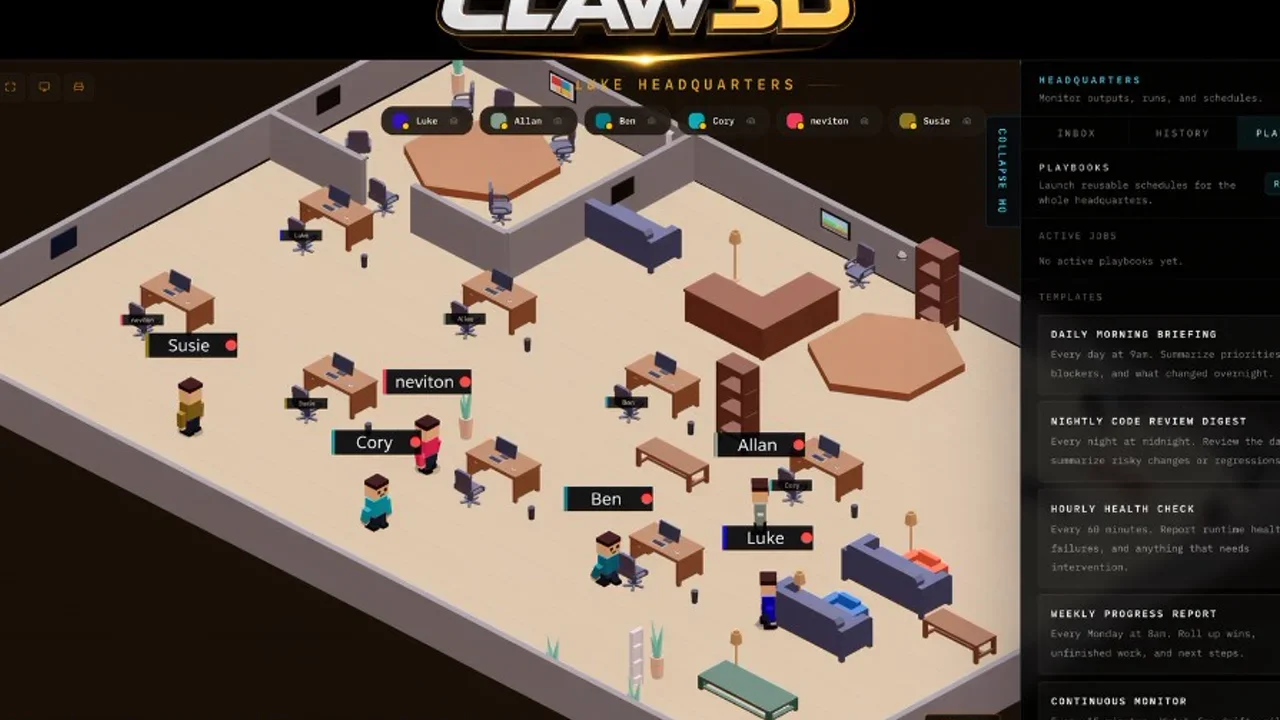
Claw3D is a 3D virtual office that solves exactly this problem. It visualizes your AI agents in real time — moving around the office, conducting code reviews, holding standup meetings, and executing tasks as if they were actually there.
In this article, we'll cover:
- What Claw3D is (and how it relates to OpenClaw / Hermes)
- Key features and capabilities
- Installation guide (super beginner-friendly)
- How to actually use it — with screen visuals
- Pros and cons
- Who it's best for
If you're thinking "I want to run AI agents as a team," this is for you.
Official site: claw3d.ai GitHub: iamlukethedev/Claw3D (⭐2,000 / MIT License)
What Is Claw3D? Its Relationship with OpenClaw in 3 Lines
First, let's sort out the cast of characters to understand Claw3D.
| Product | Role | Developer |
|---|---|---|
| OpenClaw | AI agent execution runtime (Gateway) | Peter Steinberger |
| Claw3D | 3D visualization office for AI agents | LukeTheDev (@iamlukethedev) |
| Hermes Agent | AI agent framework (alternative runtime) | Nous Research |
In short:
- OpenClaw = the "engine" that runs AI agents
- Claw3D = the 3D office that "visualizes" the agents running on that engine
- Both are open source (MIT License) and free
Claw3D is not an "official product" of OpenClaw — it's an independent project developed by community member LukeTheDev. However, its integration with the OpenClaw Gateway is first-class, making it the de facto "3D frontend for OpenClaw."
There's also an official Hermes Agent adapter, so Hermes users can use it too.
Why Do You Need a 3D Office?
Traditional AI agent management looked something like this:
Log: [14:23:01] Agent-3: Tool call: search_web("API pricing comparison 2026")
Log: [14:23:04] Agent-3: Analyzing results...
Log: [14:23:07] Agent-1: Code review complete
You can't intuitively grasp what's happening.
Claw3D transforms this into:
- Agent working at a desk → you can see it with your own eyes
- Code review in progress → you can see them gathered in the meeting room
- An error occurred → an alert appears in the office
It's an approach of understanding through space × visuals.
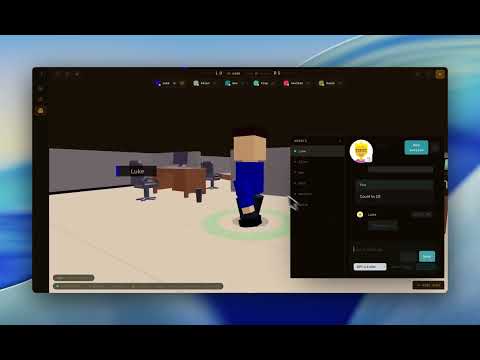
Check out the actual behavior in this video:
Key Features
| Feature | Description |
|---|---|
| 3D Office | Retro-style 3D office space. Displays agents working at desks and in meeting rooms |
| Agent Management (Fleet) | List, create, configure, and manage sessions for multiple agents |
| Real-time Chat | Chat directly with agents. Streaming updates from the Gateway |
| Standup Meetings | Automated morning standups with GitHub/Jira integration and visualization |
| Code Review | View and manage PR review status from within the office |
| QA Pipeline Monitoring | Monitor test execution and pipeline status from the office |
| Gym (Skill Training) | A space for agents to learn new skills |
| Janitor | Session resets and context cleanup |
| Office Builder | Edit and publish 3D office layouts |
| Multi-Agent | Multiple agents running and collaborating simultaneously (beta) |
Installation & Setup (Complete Beginner's Guide)
You can install Claw3D in 5 minutes — all you need is Node.js.
Prerequisites
- Node.js 20+ (Node 24 recommended)
- npm 10+
- One of the following runtimes:
- OpenClaw Gateway (running + URL and token)
- Hermes Agent (via adapter)
- Demo mode (nothing needed)
If You Don't Have Node.js Yet
# Check your version
node --version
npm --version

# Install if missing (nvm recommended)
curl -o- https://raw.githubusercontent.com/nvm-sh/nvm/v0.40.4/install.sh | bash
nvm install 24
nvm use 24
Step 1: Clone Claw3D
git clone https://github.com/iamlukethedev/Claw3D.git claw3d
cd claw3d
Step 2: Install Dependencies
npm install
Step 3: Environment Setup
cp .env.example .env
You don't need to change anything. Edit later if needed.
Step 4: Launch (Demo Mode)
You don't need OpenClaw or Hermes yet. The built-in demo Gateway lets you experience the Claw3D world.
Terminal 1 (start the demo Gateway):
npm run demo-gateway
Terminal 2 (start Claw3D):
npm run dev
Open http://localhost:3000 in your browser.
Step 5: Connection Settings
- Follow the on-screen instructions, select "Demo" under Backend
- Enter
ws://localhost:18789as the connection target - Click "Connect"
You should see demo agents appear in the office and start moving around.
How to Actually Use It: Connecting to OpenClaw / Hermes
Connect to OpenClaw Gateway
If you already have OpenClaw running:
# Check OpenClaw Gateway status
openclaw gateway status
In Claw3D's settings screen, select "OpenClaw" as the Backend and enter your Gateway URL (e.g., ws://localhost:18789) and token.
Connect to Hermes Agent
If you're using Hermes Agent, launch the dedicated adapter:
npm run hermes-adapter
In Claw3D's settings, select "Hermes" as the Backend and connect.
Connecting to a Remote Gateway
Tailscale is the easiest option:
# Run on the Gateway side
tailscale serve --yes --bg --https 443 http://127.0.0.1:18789

# On the Claw3D side, specify wss://<gateway-host>.ts.net
Or use SSH port forwarding:
ssh -L 18789:127.0.0.1:18789 user@<gateway-host>
Who It's Best For
| User Type | Recommendation | Reason |
|---|---|---|
| OpenClaw users | ★★★★★ | The original target. A dramatic evolution from log monitoring to 3D visualization |
| Hermes Agent users | ★★★★☆ | Connectable via adapter. Slightly more setup required |
| Anyone running AI agents as a team | ★★★★★ | Grasp the state of multiple agents at a glance |
| Demo / presentation use | ★★★★★ | The 3D office has outstanding visual impact |
| AI agent beginners | ★★★☆☆ | You can try it in demo mode. Start by just playing with it |
| Production deployment | ★★☆☆☆ | Still an experimental project. Stability is a work in progress |
Pros & Cons
✅ Pros
- + Visualize AI agent behavior — no more reading logs and terminal output. One glance at the office tells you who is doing what
- + Completely free — MIT License. Commercial use is fine. All source code is public and freely customizable
- + Multi-runtime support — OpenClaw / Hermes / custom HTTP / demo. Multiple backends supported
- + Rich demo mode — built-in demo Gateway lets you experience it instantly, even without OpenClaw or Hermes
- + Active community — Discord support, active GitHub Issues/PRs. Growing past ⭐2,000 stars
❌ Cons
- - Still experimental — not "production ready." Bugs and limitations remain
- - Setup requires technical knowledge — basic Node.js and Git skills needed. High barrier for complete non-engineers
- - OpenClaw / Hermes must be set up beforehand — Claw3D alone cannot run AI agents. A separate runtime is required
- - Resource consumption — uses 3D rendering (Three.js), so decent machine specs are needed
- - Limited Japanese documentation — official docs are English-only. Almost no Japanese-language information yet
FAQ
Q1: Are Claw3D and OpenClaw separate things?
Yes. OpenClaw is the AI agent execution runtime; Claw3D is the visualization layer. Claw3D is not an "official product" of OpenClaw — it's a community project.
Q2: Is it free?
Completely free. It's released under the MIT License, and everything including the source code is available at no cost.
Q3: Can I use it without OpenClaw?
There's a demo mode, so you can experience Claw3D without OpenClaw. However, to run actual AI agents, you'll need either OpenClaw or Hermes.
Q4: Does it work with Hermes Agent?
Yes. You can connect via the Hermes adapter (npm run hermes-adapter).
Q5: Does it run on Windows?
Yes, it works on Windows too. Install Node.js 20+ and follow the same steps.
Q6: Can I use it in production?
It's still experimental. There are risks in production use. We recommend it for testing and evaluation purposes.
Q7: Is Japanese supported?
The UI is English-only. There's no Japanese documentation yet. However, you can chat with agents in Japanese.
Summary: Visualize Your AI Agent Operations with Claw3D
Claw3D is a groundbreaking project that brings a "visual feedback loop" to AI agent operations.
- If you're an OpenClaw or Hermes Agent user, you can see at a glance what your agents are doing in a 3D office
- If you haven't tried it yet, start with demo mode to experience it firsthand
- Completely free, MIT License — try it without any risk
The era of running AI agents as a team is right around the corner. Claw3D is a tool that lets you get a "visible" head start on that future.
Get started now:
git clone https://github.com/iamlukethedev/Claw3D.git
cd Claw3D
npm install
npm run demo-gateway  # Terminal 1
npm run dev           # Terminal 2
Open http://localhost:3000 in your browser, and your AI agent office begins.
- Official site: claw3d.ai
- GitHub: GitHub - iamlukethedev/Claw3D
- Discord: Claw3D Discord
Related Articles
- Hermes Agent Memory Comparison 2026: Built-in vs Honcho vs Mem0 vs Hindsight vs ByteRover (All 9 Types)
- Loop Library Complete Guide 2026: 70 Copy-and-Paste AI Agent Loops
- scroll-world Complete Guide 2026: The Revolutionary Agent Skill That Auto-Generates "Scrollable 3D Worlds" with Claude Code/Codex
- Blender MCP with Hermes Agent Complete Guide 2026: Beginner-Friendly Setup for Telling AI to Do 3D Modeling
- How to Build AI Agents: "Loops" vs "Graphs" Explained 2026 — Is the Loop Engineer Era Over? Design Trends Beginners Should Know
この記事をシェアする
Related articles

2026年7月19日
Agentic Engineering 2026: Coined by Karpathy — How Google Agents CLI Is Transforming Production Development
2026年7月19日
12 Free AI Agent Courses Recommended for 2026: Learn from the World's Top Instructors
2026年8月8日
Claude Code Cross-Session Messaging Complete Guide 2026: Sessions Can Now Send Messages to Each Other
2026年8月8日
Control Your iPhone with Claude Code in 2026: Complete phone-harness Guide (with Setup Steps)
2026年8月9日
Herdr Complete Guide 2026: The New Standard Runtime Where Any Agents Can Talk to Each Other

2026年8月9日
Hermes HUD Mode Complete Guide 2026: The Overlay AI Agent That Sees, Understands, and Controls Your Screen