Summary
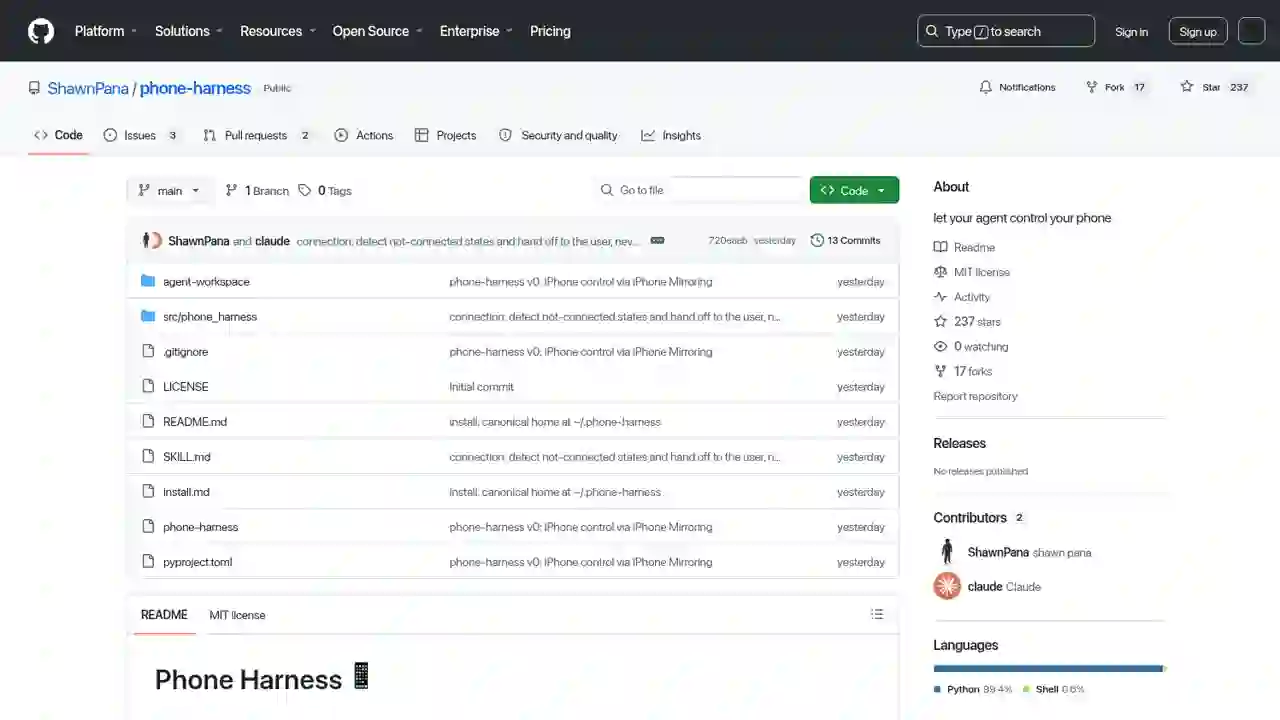
A project that flips this assumption has arrived. phone-harnessis an open-source tool that letsAI agents like Claude Code or Codex directly control your real iPhone.
Control Your iPhone with Claude Code in 2026: Complete phone-harness Guide (with Setup Steps)
"Want Claude Code to control your real iPhone, but thought it always required a jailbreak or a complicated API setup?"
"Wouldn't it be great if Claude Code could control my iPhone..." "Automating iOS apps always requires an API or jailbreak — that's a high barrier..."
A project that flips this assumption has arrived. phone-harnessis an open-source tool that letsAI agents like Claude Code or Codex directly control your real iPhone.
No jailbreak, no API, no Xcode, no WebDriverAgent. It uses macOS's iPhone Mirroringfeature to operate the iPhonejust like a human would. It has gathered 2,400+ likes on X and 179 stars on GitHub.
In this article, I'll fully explain how phone-harness works, how to set it up, and how to use it — in beginner-friendly terms.
What You'll Learn in This Article
- What phone-harness is (and what it can do)
- Why it works without an API or jailbreak
- Setup steps (with the official setup prompt)
- How to actually use it (code examples)
- Limitations and things to watch out for
What Is phone-harness?
phone-harness is a thin harness (control layer) that connects an LLM (AI agent) directly to your real iPhone.
Key features
- Automate iOS apps like a human
- Native iPhone control → no API, no jailbreak
- Connect once, control anytime
- Setup is done with a single prompt
Developed by Shawn Pana (@shawn_pana). It's open source under the MIT license and published on GitHub.
Why It Works Without an API or Jailbreak
The secret lies in macOS's "iPhone Mirroring" feature.
On macOS Sequoia and later, iPhone Mirroring displays your iPhone's screen as a Mac window and forwards mouse and keyboard input from the Mac as touch operations on the iPhone.
phone-harness uses this mechanism as-is.
The 3 Basic Actions
| Action | How it works |
|---|---|
| See | Captures the mirroring window and uses Apple's Vision framework OCR to get every visible string with tap-ready coordinates. The poor man's DOM |
| Act | Sends HID-level CGEvents: taps, long-presses, drags/flicks, scroll gestures, and unicode typing |
| Verify | Takes another screenshot after acting. With no DOM, the capture is the ground truth |
Setup Steps (Done with a Single Prompt)
Step 1: Paste the Setup Prompt
Paste the following prompt into Claude Code (or Codex):
Set up phone-harness for me. Clone https://github.com/ShawnPana/phone-harness
into ~/.phone-harness (its canonical home) and read `install.md` first to install
it and connect it to my real iPhone
through the macOS iPhone Mirroring app — install it so `phone-harness` is a
command on my PATH, and register it as an agent skill named phone-harness using
`phone-harness skill` as the body, so you reach for it automatically. Then read
`SKILL.md` for normal usage, and always read `src/phone_harness/helpers.py`
because that is where the functions are. Whenever you capture or verify the
screen, activate the iPhone Mirroring window so I can see what you're doing on
the phone.

Setup needs two things only I can do: pairing iPhone Mirroring with my phone
once, and granting the terminal Accessibility + Screen Recording in System
Settings — walk me through those and wait for me. Verify with
`./phone-harness --doctor`.

After it's installed, as a quick demo that interaction works, go to my Home
Screen and — if the phone is connected and unlocked — ask me whether you should
open the Weather app as a harmless test; only open it if I say yes. If the
session is paused or the phone is locked, just tell me the doctor status instead.
Step 2: The 2 Things Only You Can Do
The agent handles everything automatically, but these two require physical action:
| Setting | Details |
|---|---|
| Pair iPhone Mirroring | The initial pairing requires physical interaction with your iPhone |
| Grant terminal permissions | In System Settings → Privacy & Security, allow "Accessibility" and "Screen Recording" |
- Accessibility: needed for taps and keystrokes (applies immediately)
- Screen Recording: needed to see the screen (takes effect after the terminal restarts)
Step 3: Verify Everything Works
./phone-harness --doctor
It automatically checks whether all permissions and the connection are working.
Usage
Basic Example
phone-harness is a CLI that executes Python scripts from stdin, with helper functions pre-loaded.
./phone-harness <<'PY'
open_app("Notes")
tap_text("New Note")
type_text("hello from the harness")
print([o["text"] for o in ocr()][:10])
PY
This example opens the Notes app → taps "New Note" → types text → reads the on-screen text, fully automated.
Day-to-Day Workflow
Since SKILL.md is registered as an agent skill, Claude Code will automatically call phone-harness when needed.
What the agent's workflow looks like:
● agent: wants to open Weather
│
● ocr() → "Weather" at (400, 468)
│
● tap(400, 468) → wait_stable() → ocr() confirms the forecast
✓ done
The agent autonomously runs the "See → Act → Verify" loop.
Architecture (What's Inside)
| File | Role |
|---|---|
| SKILL.md | |
| install.md | |
| src/phone_harness/mirror.py | |
| src/phone_harness/ocr.py | |
| src/phone_harness/helpers.py | |
| src/phone_harness/admin.py | |
| agent-workspace/agent_helpers.py |
The mirror transport is stateless(window bounds and captures are re-queried per call), sono daemon is needed. Every invocation is self-contained.
Limitations
- One iPhone, one session: unlocking the physical phone pauses mirroring
- No multi-touch: pinch gestures aren't supported
- No camera / Face ID flows: operations requiring facial recognition aren't possible
- DRM video renders black: copy-protected content won't show
- OCR only sees text: unlabeled icons need a screenshot + a vision-capable model
- macOS Sequoia or later required: iPhone Mirroring must be available
- Early-stage project: it's at v0 — expect to adjust and test for your own use
Summary
phone-harness realizes the future of "AI agents controlling your own iPhone" without jailbreaking or an API.
- Combines iPhone Mirroring + OCR + CGEvent — all macOS built-in features
- Setup is a single prompt (only pairing and permissions are on you)
- Autonomous operation via the See → Act → Verify loop
- Published on GitHub under the MIT license (github.com/ShawnPana/phone-harness)
- No Android version yet (there are already requests in the comments)
For anyone who wants to "leave even iPhone operation to Claude Code," this is exactly the tool you've been waiting for. Start by pasting the official setup prompt into Claude Code and trying the open-the-Weather-app test.
Related reading
- Learn Claude Code Complete Guide 2026: The Free Learning Site That Builds Your Own AI Agent from Scratch in 20 Sessions
- Cloudflare Kitesurf Complete Guide 2026: The Agent-First Browser That Uses Up to 7x Less Memory Than Chromium
- DeepSeek Harness Explained 2026: What It Can Do, How It Differs from Codex & Claude Code, and the Best Way to Use It
Share this article
Related articles
Aug 12, 2026
Learn Harness Engineering Complete Guide 2026: The Free Course That Makes AI Agents Reliable with a "Harness"

Jun 22, 2026
Hermes Agent Complete Guide 2026: The Most Powerful Open-Source AI Agent by Nous Research
Aug 10, 2026
Complete Guide: DeepSeek V4 Flash × 8 Agent Harnesses in 2026 — Composio Eval Shows Pi Agent Is Cheapest & Passes the Most Tasks
Aug 9, 2026
Hermes HUD Mode Complete Guide 2026: The Overlay AI Agent That Sees, Understands, and Controls Your Screen
Jun 22, 2026
Hermes Agent vs Cursor — Full Comparison 2026: Which Should You Choose? Complete Guide to Using Both
Aug 14, 2026
Hermes Agent Bot Mode Complete Guide 2026: Turn Your AI Agents into a Team of Named Bots with Roles, Models, Memory, and Avatars