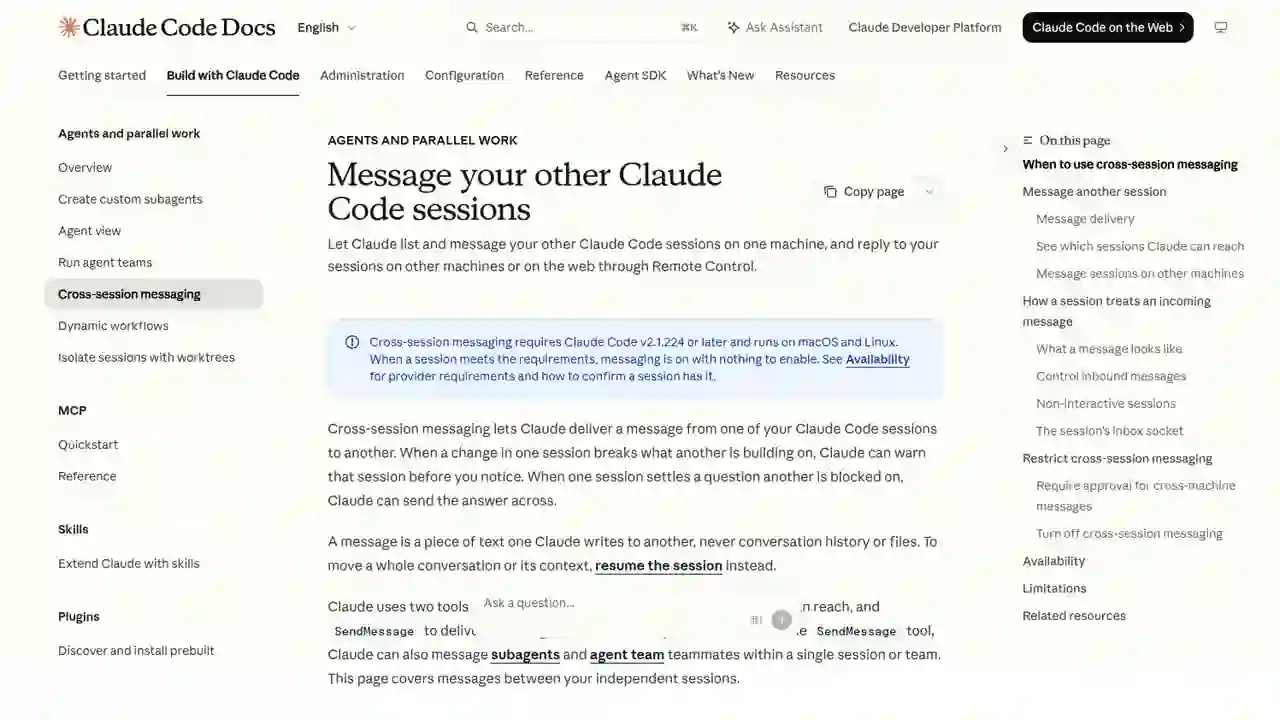
Summary
That problem was solved in August 2026. Claude Code added cross-session messaging — sessions can send messages to each other. The official announcement on X gathered over 55,000 likes, making it a major feature.
Claude Code Cross-Session Messaging Complete Guide 2026: Sessions Can Now Send Messages to Each Other
"Tired of copy-pasting handoffs between Claude Code sessions running in different terminals?"
「I want to tell Claude Code running in another terminal what I just did…」 「Copy-pasting handoffs every time is such a pain…」
That problem was solved in August 2026. Claude Code added cross-session messaging — sessions can send messages to each other. The official announcement on X gathered over 55,000 likes, making it a major feature.
Simply put: Claude Code sessions running in separate terminals can now exchange messages. Instead of copy-pasting context between sessions, you just tell Claude "send this to the other session."
This guide fully explains the mechanism, usage, and cautions for beginners.
What you'll learn in this article
- What cross-session messaging is
- Why it's impressive (what changes)
- Concrete usage (with real prompt examples)
- How messages between sessions are delivered (the mechanism)
- Security, limitations, and cautions
Why it's impressive: the reason it got 55,000 likes
On August 7, 2026, the Claude Code official account announced:
- Your sessions can send messages to each other
- Instead of re-explaining yourself to another session, just tell Claude "send it" and it delivers a summary
- Only summaries are sent (history and files are not)
- Bidirectional: you can ask other sessions questions and receive answers
- Claude can also proactively send messages (e.g. when your changes affect another session's work)
The key point is freeing context handoffs from manual copy-paste. For anyone doing parallel development across multiple terminals, this is a major productivity boost.
What is cross-session messaging?
Mechanism (diagram)
How to use it
1. Check that the other session is visible
Run in the terminal:
/list-agents
If other sessions appear, cross-session messaging is enabled.
2. Tell Claude to send a message
Just say it in natural language:
Tell the session working on the API server that I've finished the DB schema changes.
Claude discovers the target session and sends the summary via SendMessage.
3. Ask another session a question
Ask the frontend session what the current state of the component refactor is.
The reply comes back to your session.
Security and limitations
| Item | Description |
|---|---|
| Only summaries are sent | History and file contents are never included |
| Approval not possible | Sessions cannot approve each other |
| Settings cannot be changed | Cannot modify other sessions' config |
| Commands are not executed | Receiving session does not run commands from the message |
| Availability | macOS / Linux · Claude Code v2.1.224+ |
How it differs from other features
| Purpose | Feature |
|---|---|
| Continue a conversation in another terminal / share context | resume sessions |
| Team work generated & supervised by Claude | agent teams |
| Monitor & operate many sessions on one screen | agent view |
| Operate from another device like a phone | Remote Control |
| Incorporate external events like CI results | channels |
Summary
Claude Code's cross-session messaging is a feature that dramatically changes productivity for people doing parallel development across multiple terminals.
- Handoffs to other sessions go from copy-paste to a single instruction
- Only summaries are sent, so history and files never leak
- Bidirectional — questions and answers are possible
- Security restrictions are solid (no approvals, no settings changes, no command execution)
- Available on macOS / Linux with Claude Code v2.1.224+
The more you run "multiple AI coding agents at once," the more you'll feel the value of this feature. Start by checking /list-agents to see if other sessions are visible, then try it with two terminals.
Related reading
- Herdr Complete Guide 2026: The New Standard Runtime Where Any Agents Can Talk to Each Other
- Learn Claude Code Complete Guide 2026: The Free Learning Site That Builds Your Own AI Agent from Scratch in 20 Sessions
- Control Your iPhone with Claude Code in 2026: Complete phone-harness Guide (with Setup Steps)
Share this article
Related articles

Jul 7, 2026
A Fable of Codexes Complete Guide 2026 — How to Build an AI Worker Army Led by Claude

Aug 10, 2026
Complete Guide: DeepSeek V4 Flash × 8 Agent Harnesses in 2026 — Composio Eval Shows Pi Agent Is Cheapest & Passes the Most Tasks

Jun 22, 2026
Hermes Agent vs Cursor — Full Comparison 2026: Which Should You Choose? Complete Guide to Using Both
Jul 5, 2026
Fable Loop Library Complete Guide 2026: Fully Automating Claude Fable 5 with 25 Workflows, Explained for Beginners

Jul 4, 2026
Unreal Engine MCP Complete Guide 2026: Using UE5.8 AI Integration with Hermes Agent & Claude Code for Beginners
Aug 12, 2026
Learn Harness Engineering Complete Guide 2026: The Free Course That Makes AI Agents Reliable with a "Harness"