Summary
「AI agents aren't just for individuals — they can change the way an entire company works……」
Cloudflare OS Complete Guide 2026: The Open-Source AI Operating System for Your Company, Explained for Beginners
「AI agents aren't just for individuals — they can change the way an entire company works……」
On August 6, 2026, Cloudflare made a striking announcement.
Cloudflare OS — an open-source platform that combines company knowledge, processes, and systems with AI agents to give every employee "an AI agent and workspace."
And the source code is free under the Apache 2.0 license. GitHub stars passed 4,300 immediately after release. The developer community reacted instantly.
In this article:
- What Cloudflare OS is (super easy to understand)
- What it can do (Ask / Make / Build / Run / Share)
- How security works (Gatekeeper・zero-access)
- How to deploy it
- How it's actually used inside Cloudflare
🎯 Bottom Line: What Can Cloudflare OS Do?
Cloudflare OS = an "AI operating system" customizable for your company.
You chat with AI in the browser, and that AI — understanding your company's knowledge (terms, processes, rules) — safely accesses internal systems (GitHub, Notion, BigQuery, etc.) and does the work.
Five capabilities:
- 🔍 Ask: Investigate company data and answer questions
- 📄 Make: Automatically create documents, slides, and spreadsheets
- 🧩 Build: AI builds business apps connected to live data
- ⚙️ Run: Automatically run agents and recurring workflows
- 🤝 Share: Share and reuse apps across the team
The problem — "I want to delegate work to AI, but explaining where everything lives in our internal systems is painful" — is solved by teaching company knowledge to AI in advance.
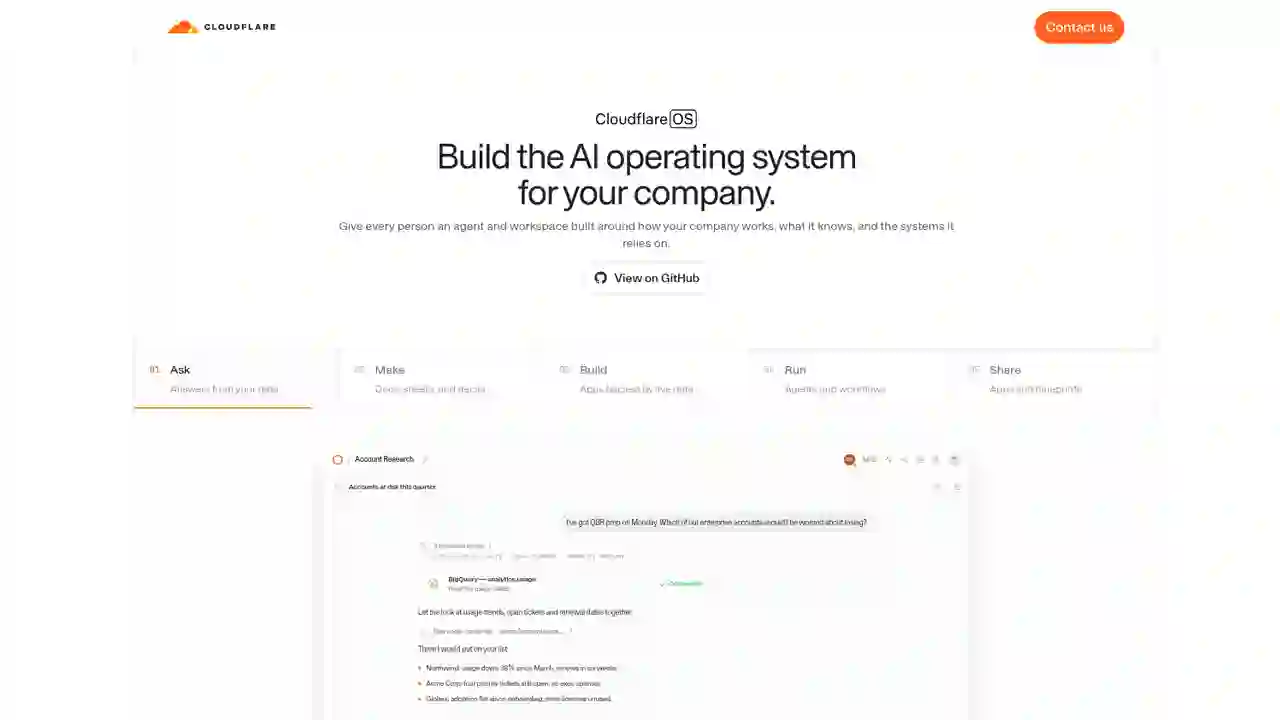
🖥️ What Is Cloudflare OS? Let's Look at the Official Site
Cloudflare OS's tagline:
Build the AI operating system for your company.
Just as Windows or macOS is the "basic software of a PC," Cloudflare OS aims to be the "basic software of a company in the AI era."
Why "OS"?
Ordinary AI tools assume "one person using it alone." But work requires:
- Company-specific terms ("QBR," "deal stages," etc.)
- Processes ("reviews go like this," "approvals use this form")
- Systems (GitHub, Salesforce, BigQuery, Notion…)
Explaining all of that to AI from scratch every time is unrealistic.
Cloudflare OS is a "foundation (OS) you can teach your company's way of working to AI" — that's why every employee can actually use AI in their daily work.
🏗️ The 3 Building Blocks of Cloudflare OS
① Agent Workspace
- Works in the browser, so non-developers can use it
- Integrates agent conversations, state, output files, and resource access into one workspace
- Company-curated "skills" and "context" are pre-loaded
- When someone finds a "better way," it can be shared with everyone
② Security & Governance Foundation
- Every agent starts with "access to nothing"
- Access uses an "request → approve" flow each time
- Gatekeeper — a dedicated gate standing between internal systems and AI, centralizing authentication, permissions, and auditing
- Details below
③ App Platform
- When "a document isn't enough," AI builds a dedicated app
- Each app is full-stack (UI + server + database), and sharing makes it usable by the whole team
- Sharing the "blueprint" lets others fork and improve their own copy
🔍 What Can It Actually Do? 5 Capabilities (Ask / Make / Build / Run / Share)
01 Ask: Ask Your Company's Data
Ask AI "Which enterprise accounts are at high churn risk this quarter?" and it searches, aggregates, and analyzes internal data directly (e.g., BigQuery).
The key: instead of loading all data into AI's "memory," it writes code to search only the parts needed. Efficient for both cost and security.
02 Make: Create Documents, Slides & Tables
Research results can be converted directly into documents, presentations, and spreadsheets.
More importantly, the output isn't a "static file":
- Stays connected to live data
- Auto-updates when the source data changes
- Can be exported to Google Drive, etc.
03 Build: Build Apps Connected to Live Data
When tables and documents aren't enough, AI builds apps with their own UI, logic, and state.
Examples: "internal budget dashboard," "inventory check tool." Real-time multi-user collaboration is also possible.
04 Run: Run Agents & Recurring Workflows
Recurring tasks like "every morning, post a summary of unread emails to Slack" can be run on a schedule or event trigger.
You don't have to hand everything to AI — a hybrid setup is possible: code for fixed steps, AI only for judgment calls.
05 Share: Share Apps & Blueprints
Two ways to share apps you've built:
- Share the app itself: team collaborates in real time on the same data
- Share the blueprint: others fork their own copy and improve it with AI
Instead of "submitting a feature request," you build a culture of "fix it yourself."
🔒 How Security Works: Why Is It Safe?
Cloudflare OS's biggest selling point is "safe access to internal systems." Three keywords:
① Agents Start with Zero Access
- Every agent and app sees nothing initially
- It requests access to a specific resource → a human allows or denies
- Generated code only carries "capabilities bound to permitted resources"
For example, permitted code looks like this:
const issues = await env.PROJECT.listIssues({
  teamId: "ENG",
  state: "open",
});
env.PROJECT is a capability meaning "you may use this specific resource under this policy." Credentials are fully isolated from the agent.
② Gatekeeper Mediates Everything
Gatekeeper = a "dedicated gatekeeper" standing between internal systems and AI.
- Understands service-specific APIs, resources, and operations
- Handles OAuth authentication and holds credentials
- Applies policies (e.g., "you can read issues in this repo, but not source code," "merging PRs requires approval")
- Logs what was read, and mediates operations with external impact
Instead of "your whole GitHub account," you get minimal access like "this one repo only," "read issues only."
③ Policies Follow What the Agent Sees
Policies are tied to observable behavior — when you share something an agent produced, the system re-validates against observation logs. The principle is "using AI never expands employee permissions."
🚀 How to Deploy It
Cloudflare OS is open source, so you can deploy it to your own Cloudflare account.
- Get the source from GitHub (Apache 2.0)
- Deploy to your Cloudflare account (docs provided)
- Add company context and skills (terms, processes, best practices)
- Connect internal systems through Gatekeeper
- Start with Ask / Make, then expand to Build / Run / Share
| Product | Who It Is For | Role |
|---|---|---|
| Cloudflare OS | Whole company (all employees) | OS for AI agents & workspaces. Company knowledge + system connections + app platform |
| Monetization Gateway | Site operators | Seller-side foundation for one-time billing on web pages, APIs & MCP tools |
| Cloudflare Wallets | AI agent buyers | Buyer-side wallet where agents pay with stablecoins |
| Workers / AI Gateway | Developers | Code execution foundation & unified AI model calls |
Cloudflare OS is the "platform for getting work done"; Monetization Gateway and Wallets are the "foundation for money flows." Reading them together gives you the full picture.
🤔 FAQ
❓ Is it free?
The source code is free under the Apache 2.0 license. Deploy to your own Cloudflare account to use it (Cloudflare service usage fees may apply separately).
❓ Can non-developers use it?
Yes. It runs in the browser, so no command-line or terminal knowledge needed. Many non-engineering teams inside Cloudflare use it daily.
❓ Which AI models can I use?
Any model. All inference goes through Cloudflare AI Gateway, so your organization can centrally manage "which model for which job." You can also control cost — e.g., use expensive frontier models only for hard tasks.
❓ Can I use existing MCP servers?
Yes. With MCP Server Portals, existing MCP servers can be used under Cloudflare Access policies.
❓ Is security really safe?
It's designed on the principle "using AI never expands employee permissions." Agents start with zero access, Gatekeeper handles authentication, policy, and auditing, and sharing re-validates against observation logs.
❓ Can I create context and skills in Japanese?
Yes. You can register company terms, processes, and best practices as skills and context, in Japanese. Teaching "how your company works" directly to AI is Cloudflare OS's strength.
🔮 Summary: The "Company OS" of the AI Era Arrives as Open Source
Cloudflare OS is the "company OS that gives every employee an AI agent and workspace."
- 🔍 Ask: Investigate and analyze internal data
- 📄 Make: Auto-create documents, slides, and tables
- 🧩 Build: AI builds business apps connected to live data
- ⚙️ Run: Auto-run recurring workflows
- 🤝 Share: Share apps and blueprints
And the "zero-access-first" security design plus the "teach company knowledge to AI" context foundation are what make it fundamentally different from personal AI tools.
Since it's open source, you can deploy it to your own Cloudflare account in minutes and try it.
The transition from "using AI personally" to "using AI across the whole company." Cloudflare OS is at the forefront.
📖 Related Articles
- Cloudflare Wallets Complete Guide: The New Payment System Where AI Agents Pay Automatically — the "buyer-side" foundation where agents pay
- Cloudflare Monetization Gateway Complete Guide: Adding One-Time Billing to Web Pages, APIs & MCP Tools — the "seller-side" foundation where site operators get paid
この記事をシェアする
Related articles

2026年7月19日
Agentic Engineering 2026: Coined by Karpathy — How Google Agents CLI Is Transforming Production Development
2026年7月19日
12 Free AI Agent Courses Recommended for 2026: Learn from the World's Top Instructors
2026年8月8日
Claude Code Cross-Session Messaging Complete Guide 2026: Sessions Can Now Send Messages to Each Other
2026年8月8日
Control Your iPhone with Claude Code in 2026: Complete phone-harness Guide (with Setup Steps)
2026年8月9日
Herdr Complete Guide 2026: The New Standard Runtime Where Any Agents Can Talk to Each Other
2026年8月9日
Hermes HUD Mode Complete Guide 2026: The Overlay AI Agent That Sees, Understands, and Controls Your Screen