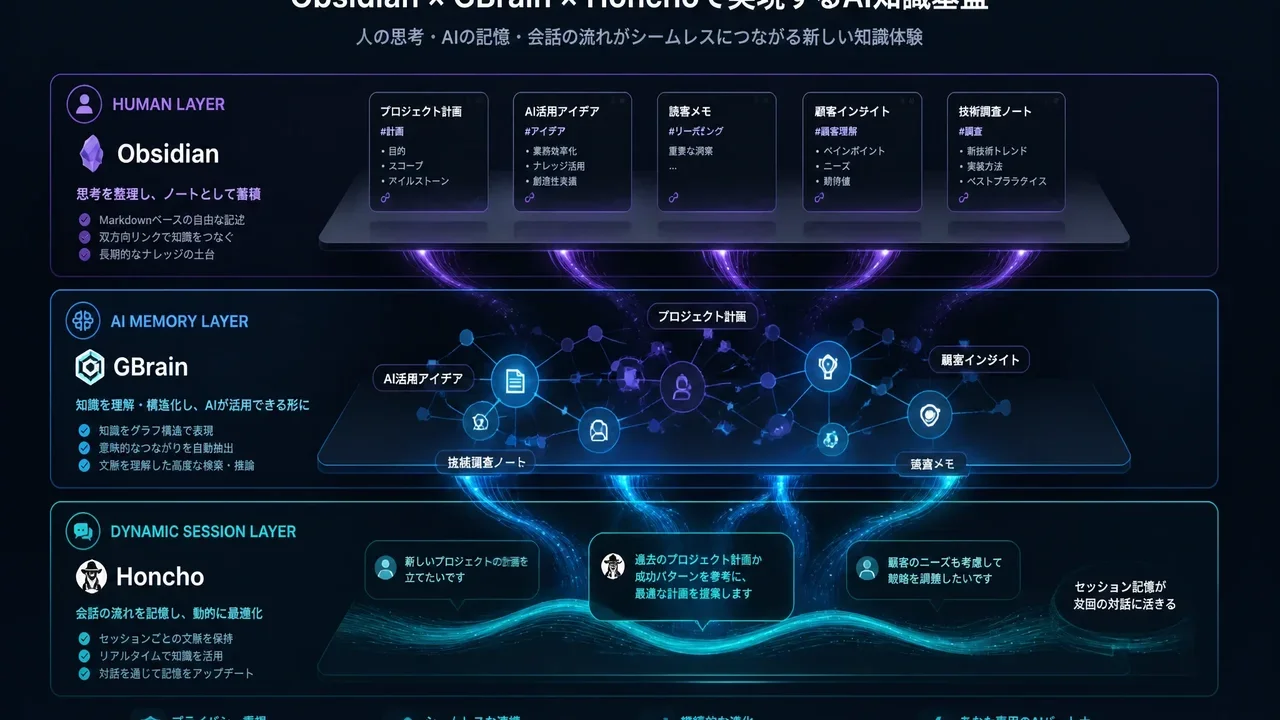
Summary
As of July 2026, the strongest setup is "Obsidian + GBrain."
Honcho vs Obsidian vs GBrain 2026: Which AI Memory System Is Best for Agents?
"Wondering whether to give your AI agent built-in memory, a dedicated memory service like Honcho, or just use Obsidian?"
TL;DR: As of July 2026, the strongest setup is "Obsidian + GBrain."
If you're a heavy Hermes Agent user, "Obsidian + GBrain + Honcho" is the ultimate combo. This article explains each tool's role and provides a beginner-friendly setup guide.
Why Is "AI Agent Memory" Such a Hot Topic Right Now?
On July 7, 2026, AI engineer Shubham Saboo posted this on X:
"Your AI agent doesn't need more memory. It needs Taste."
This post instantly went viral, and even Grok joined the conversation: "GBrain vs Honcho vs Obsidian — which one is the strongest?"
For AI agents to become truly useful, the biggest challenge is how they remember and leverage past information. But with so many options, it's easy to get lost.
This article provides a complete breakdown of the three tools — their differences, roles, and the optimal combination.
Understanding the Roles of the Three Tools
Each tool serves a different purpose. The answer isn't "which one is best" — it's "how to combine them."
| Tool | In a Nutshell | Primary Use | Developer |
|---|---|---|---|
| 📝 Obsidian | Knowledge base for humans | Note-taking, writing, information organization | Dynalist (OSS) |
| 🧠 GBrain | Knowledge graph for AI agents | Long-term AI memory, self-wiring knowledge graph | Garry Tan (YC CEO) |
| 💬 Honcho | Dynamic session memory provider | Hermes Agent conversation history management | Nous Research / Coleman |
What Is GBrain?
GBrainis an open-source memory system for AI agents developed byGarry Tan, CEO of Y Combinator.
It automatically reads Markdown notes and builds a self-wiring knowledge graph.
The Core of GBrain
Feed it Markdown → 🧠 A knowledge graph is automatically built → 🤖 AI agents can use it
In Garry Tan's own production environment, GBrain manages 146,646 pages, 24,585 people, 5,339 companies, and 66 autonomous cron jobs.
Tech Stack
┌──────────────────────────────┐
│ AI Agent (OpenClaw / Hermes) │
├──────────────────────────────┤
│ MCP Tools (74+ tools)        │
├──────────────────────────────┤
│ Hybrid Search Engine          │
│  ├── Vector (embedding search)│
│  ├── BM25 (keyword search)    │
│  └── Graph (entity relations) │
├──────────────────────────────┤
│ PGLite (embedded PostgreSQL)  │
│  → No server needed, 2-sec    │
│    startup                    │
└──────────────────────────────┘
Benchmarks
Performance on the official BrainBench (240-page rich-text corpus):
- P@5: 49.1% (precision)
- R@5: 97.9% (recall)
- +31.4-point precision improvement compared to disabling the graph layer
Installation
# 1. Global install (just one line)
bun install -g github:garrytan/gbrain

# 2. Initialize (2 seconds, no server, no Docker)
gbrain init --pglite

# 3. Health check
gbrain doctor

# 4. Import Obsidian notes
gbrain import ~/notes/

# 5. Try a search
gbrain query "What are the themes in my notes?"
Integration with Hermes Agent
# Connect to Hermes Agent via MCP
gbrain mcp --agent hermes
That's it — Hermes Agent can now read from and write to GBrain's knowledge graph.
What Is Honcho?
Honcho is one of Hermes Agent's standard memory providers.
While GBrain specializes in knowledge accumulation and structuring, Honcho excels atdynamic conversation flow and user adaptation.
What Honcho Is Good At
- ✅ Dynamically managing conversation history with users
- ✅ Cross-session user adaptation
- ✅ Ideal for short- to mid-term memory
- ✅ Super easy integration with Hermes Agent (one config line)
Honcho Setup
# Add to Hermes Agent's config.yaml
memory:
  provider: honcho
  config:
    api_key: ${HONCHO_API_KEY}
What Is Obsidian?
Obsidian is the well-known, best-in-class note-taking app.
In the context of AI agents, its key role is as a human-readable, human-editable knowledge base.
Why Obsidian Is the Best
- ✅ Human-readable — you can inspect and edit the content yourself
- ✅ Markdown-native — easy for AI to read and write
- ✅ Local-first — all data lives on your own machine
- ✅ Rich plugin ecosystem — Graph View, Dataview, Templater, and more
Ultimate Combination Rankings
Here's a ranking of the most highly-rated configurations, based on Grok discussions and real community usage.
#1: Obsidian + GBrain (★★★★★)
The ultimate setup recommended for most people.
| Component | Role |
|---|---|
| Obsidian | Humans write and organize notes |
| GBrain | Automatically turns Obsidian Markdown into a knowledge graph that AI can use |
Strengths of this setup:
- "Human writes" → "Saved in Obsidian" → "GBrain auto-structures it" → "AI leverages it"
- Zero additional cost if you already use Obsidian
- Gives your AI agent "Taste" (Shubham Saboo's concept)
#2: Obsidian + GBrain + Honcho (★★★★☆)
For heavy users who rely on Hermes Agent every single day.
| Component | Role |
|---|---|
| Obsidian | Human knowledge base |
| GBrain | Long-term AI memory / knowledge graph |
| Honcho | Dynamic session memory / user adaptation |
Strengths of this setup:
- GBrain handles "knowledge structuring"
- Honcho handles "conversation context and user adaptation"
- Clear division of labor — both shine
#3: Obsidian + Honcho Only (★★★☆☆)
For those who just want to improve Hermes Agent's memory quickly.
Honcho is extremely easy to set up, but it can't match GBrain's knowledge structuring capabilities.
What Is the "Taste Index"?
A concept proposed by Shubham Saboo:
Giving your AI agent the "taste" to judge what information is high-quality
The traditional approach was "how much information can we cram into memory," but Saboo argues that a mechanism for selecting high-quality information is what truly matters.
How to build a Taste Index (simplified):
1. Write down your criteria for "high-quality information" as notes in Obsidian
2. GBrain incorporates them into the knowledge graph
3. Hermes Agent learns your preferences and judgment criteria
4. As a result, your AI agent can "curate information on your behalf"
This is the new paradigm — not "stuffing the agent with memory," but "cultivating taste."
Hands-On: Beginner Setup Guide
Step 1: Prepare Obsidian
If you already use it, you're good to go. If not, install Obsidian and create a Vault in any folder.
Step 2: Install GBrain
# Requires Node.js / Bun
bun install -g github:garrytan/gbrain

# Initialize
cd ~
gbrain init --pglite

# Verify
gbrain doctor
Step 3: Import Obsidian Notes into GBrain
# Point to your Obsidian Vault folder
gbrain import ~/path/to/your/obsidian-vault/

# Try searching
gbrain query "What's the status of recent projects?"
Step 4: Integrate with Hermes Agent
# Start the MCP server
gbrain mcp --agent hermes
Now Hermes Agent can access GBrain's knowledge graph.
The Complete Picture
📝 Obsidian (write notes)
    ↓
🧠 GBrain (auto-builds knowledge graph)
    ↓
🤖 Hermes Agent (AI leverages the knowledge)
Questions Readers Ask
Can I use just GBrain or just Honcho?
→ Both is best. They serve different roles.
- GBrain = Knowledge structuring / long-term storage (a library)
- Honcho = Conversation context / user adaptation (a conversation notepad)
Is Obsidian required?
→ It's not strictly required, but having Obsidian is tremendously convenient because it lets humans inspect and edit the information.
GBrain looks complicated...
→ It installs in just two lines. bun install then gbrain init. No server, no Docker needed.
Can't I just use GBrain instead of Honcho?
→ GBrain specializes in "knowledge," so Honcho is better at conversation flow and short-term user adaptation. Using both is the optimal solution.
Summary
| Priority | Setup | Strength | Best For |
|---|---|---|---|
| 🥇 | Obsidian + GBrain | Ultimate combo of human-readable + AI knowledge graph | Most people (especially Obsidian users) |
| 🥈 | + Honcho added | Dynamic memory and user adaptation further enhanced | Heavy daily Hermes users |
| 🥉 | Obsidian + Honcho only | Simple Hermes memory improvement | Those not ready to try GBrain yet |
The ultimate production setup as of July 2026:
"Write notes in Obsidian, let GBrain turn them into a knowledge graph, and let Honcho manage conversation context."
This three-layer architecture enables the best collaboration between humans and AI agents.
👉 GBrain (GitHub): github.com/garrytan/gbrain 👉 GBrain Tutorial: MarkTechPost Step-by-Step Guide 👉 Hermes Agent: Hermes Agent by Nous Research 👉 Honcho: Honcho Memory Provider 👉 Shubham Saboo's X Post: Build a Taste Index with Hermes and GBrain 👉 Grok Conversation: GBrain vs Honcho vs Obsidian
Related Articles
- Hermes Agent Memory Complete Comparison 2026! Built-in vs Honcho vs Mem0 vs Hindsight vs ByteRover (All 9 Types)
- Loop Library Complete Guide 2026! 70 Copy-Paste AI Agent Loops
- scroll-world Complete Guide 2026! Revolutionary Agent Skill for Auto-Generating "Scrollable 3D Worlds" in Claude Code/Codex
- Blender MCP with Hermes Agent Complete Guide 2026! Beginner Setup for Instructing AI to Do 3D Modeling
- How to Build AI Agents 2026: "Loops" vs "Graphs" Explained! Is the Loop Engineer Era Over? Design Trends Beginners Should Know
Related reading
- Hermes Agent Memory Complete Comparison 2026: Built-in vs Honcho vs Mem0 vs Hindsight (All 9 Providers)
- Hermes Agent Bot Mode Complete Guide 2026: Turn Your AI Agents into a Team of Named Bots with Roles, Models, Memory, and Avatars
- AI Coding Agent Complete Comparison 2026: Cursor vs Claude Code vs Codex vs Hermes vs Fugu
Share this article
Related articles

Jun 22, 2026
Hermes Agent vs Cursor — Full Comparison 2026: Which Should You Choose? Complete Guide to Using Both

Aug 15, 2026
What Can You Do with the Digital Agency’s MCP for Administrative Procedures? A Beginner-Friendly Guide to Analyzing 75,000 Government Records with AI (2026)
Aug 5, 2026
Cloudflare Wallets Complete Guide 2026: The New Payment System Where AI Agents Pay Automatically, Explained for Beginners
Aug 26, 2026
DeepSeek Harness Explained 2026: What It Can Do, How It Differs from Codex & Claude Code, and the Best Way to Use It

Jun 12, 2026
Squarespace vs WordPress Ultimate Comparison 2026: How to Choose a Website Builder for Beginners
Sep 6, 2026
Vibe-Trading Complete Guide (2026): Free AI Agent for Stock & Crypto Research and Backtesting