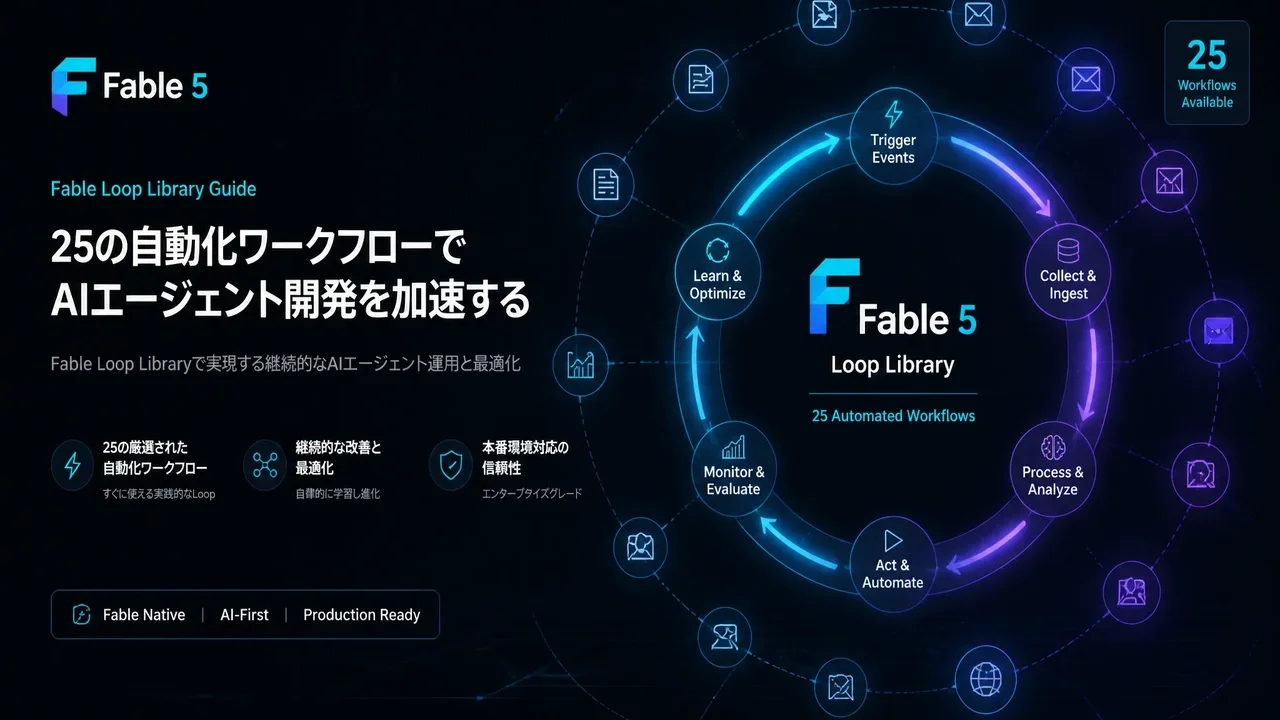
Summary
In this article, we fully explain the concept of Fable 5 "loops," an overview of all 25 workflows, the relationship with Loop Library, and how beginners can start today.
Fable Loop Library Complete Guide 2026: Fully Automating Claude Fable 5 with 25 Workflows, Explained for Beginners
"Want to let Claude Fable 5 run workflows fully on its own with ready-made loops instead of hand-holding it through every task?"
"The Fable Loop Library: 25 Workflows on Autopilot" published by Machina (@EXM7777) is a workflow collection for running Anthropic's most powerful AI model, Claude Fable 5, in fully autonomous mode.
In this article, we fully explain the concept of Fable 5 "loops," an overview of all 25 workflows, the relationship with Loop Library, and how beginners can start today.
What You'll Learn
- What Fable Loop Library is — 25 automation workflows by Machina (@EXM7777)
- The basic concept of "loops" — Andrej Karpathy's autonomous AI agent loop method
- The relationship with Loop Library — how to use Matthew Berman's Forward Future Loop Library
- Overview of the 25 workflows — purpose, prompt, and tools for each
- Setup steps to start today — getting started with Fable 5 + Loop Library
What Is Fable Loop Library?
Fable Loop Library is a workflow library for Claude Fable 5, published by Machina (@EXM7777) on July 4, 2026.
Titled "25 Workflows on Autopilot," the post provides each workflow with a prompt and tool set, explaining how to run Fable 5 autonomously without instructions.
Basic concept:
- Give Fable 5 "loops" — bounded instructions
- Each loop has a clear goal and stop condition
- When a loop finishes, move to the next loop
- Each set consists of "Loop → Goal → Tool"
The post drew 249K views, 584 likes, and 1,719 bookmarks, sparking major discussion in the AI agent world.

What Is an "AI Loop"? Explained Simply for Beginners
To understand AI "loops," it's fastest to compare with traditional AI usage.
Traditional AI Usage (one-shot)
You: "Please review this code"
AI: "Here's the review. Improvements:…"
→ Done. You need to ask again to proceed
Loop-Based AI Usage (autonomous)
You: "Continuously review this repository's code.
Fix bugs when you find them, and keep fixing until tests pass.
Stop and report when all bugs are fixed."
AI: "Checking code… bug found → fixed → test run → failed → re-fix → test passed"
→ Works autonomously in a loop
This approach, championed by Andrej Karpathy (former AI lead at OpenAI and Tesla), explicitly tells the AI agent not just "what to do" but also "when to stop."
The 3 Elements of a Loop
| Element | Description | Example |
|---|---|---|
| Goal | A clear objective for the AI to achieve | Make every page load under 50ms |
| Loop action | The repeated action toward the goal | Optimize code → measure speed → optimize → measure… |
| Stop condition | Clear conditions for when to finish | Stop when every page is under 50ms |
Relationship with Loop Library (Forward Future)
Machina's Fable Loop Library is based on Forward Future Loop Library, run by Matthew Berman.
What Is Loop Library?
A platform founded by Matthew Berman for sharing and collecting AI agent "loops."
Key facts (as of July 2026):
- Registered loops: 70+ types
- Categories: Engineering / Evaluation / Operations / Content / Design
- License: MIT License
- GitHub Stars: 2,400+
Features:
- Copy-paste ready, battle-tested prompts
- Clear stop conditions and verification steps included
- Works with Cursor / Claude Code / Codex / Factory / Devin
- Installable via
npx skills add Forward-Future/loop-library --skill loopy -g
Differences from Machina's Fable Loop Library
| Element | Loop Library (Forward Future) | Fable Loop Library (Machina) |
|---|---|---|
| Target model | Model-agnostic | Fable 5-specific |
| Loop count | 70+ (general) | 25 (Fable 5-optimized) |
| Approach | Community-submission | Karpathy-style systematized |
| Format | Per-loop | Goal + prompt + tool sets |
| Automation level | Single loops | Workflow chains (linked loops) |
In other words: if Loop Library is a "library of loops," Fable Loop Library is a "textbook of automation workflows specialized for Fable 5."
What Is Fable 5? (For Beginners)
Claude Fable 5 is Anthropic's world-class AI agent model.
Basic specs:
- Developer: Anthropic (Claude series)
- Feature: designed for "agent loops"
- Strengths: long autonomous tasks, complex code development, multi-step reasoning
- Pricing: $10/Mtok input, $50/Mtok output (usage-based)
- Usage: Claude Code / Claude Desktop / API
Difference from regular AI models:
- Regular model: one question → one answer (short session)
- Fable 5: can autonomously complete tasks over hours or days
- Handles complex multi-step work while maintaining context
Fable 5 was paused in June 2026, then re-released on July 1 with strengthened safety classifiers. A weekly usage cap (50%) is in effect until July 7.
Overview of the 25 Workflows
Machina's Fable Loop Library includes 25 workflows in these categories.
Each workflow is a 3-part set:
- Goal: the clear objective for the AI
- Prompt: the specific instruction to the AI
- Tool: the tools/plugins to use
Category Breakdown
| Category | Workflows | Target |
|---|---|---|
| Code development | 8 | Repository management, bug fixing, code review |
| Content generation | 6 | Blog posts, social posts, documentation |
| Data analysis | 4 | Log analysis, performance measurement, reports |
| DevOps | 4 | Deployment, monitoring, incident response |
| Research | 3 | Competitor research, technical research, trend analysis |
Representative Workflow Examples
- Code review automation loop
- Goal: auto-review pull requests, fix issues, and re-review
- Tools: GitHub API + Claude Code
- Stop condition: all PRs reviewed, or all fixes merged
- Documentation maintenance loop
- Goal: detect codebase changes and auto-update documentation
- Tools: Git + Markdown editor
- Stop condition: all docs match the latest code
- Performance optimization loop
- Goal: keep optimizing until page load is under 50ms
- Tools: Lighthouse + code editor
- Stop condition: all pages clear the target speed
- Bug hunting loop
- Goal: monitor error logs and auto-fix bugs
- Tools: log management + Git
- Stop condition: zero unresolved bugs
- Content generation loop
- Goal: research topic, outline, write article, and proofread automatically
- Tools: web search + text editor
- Stop condition: final proofreading done, ready to publish
Loop Stop Condition Patterns
Machina's workflows are notable for clearly defining stop conditions.
| Stop type | Description | Example |
|---|---|---|
| Completion | Stop when the goal is achieved | Stop when all tests pass |
| Blocked | Stop when external factors prevent progress | Escalate to a human when approval is needed |
| Time limit | Stop after a certain time | Report progress and stop after 30 minutes |
| Attempt limit | Stop after max retries | Stop after 3 failed retries |
How to Start with Fable 5 + Loop Library
What You Need
- Claude Code (Fable 5-compatible plan)
- Node.js 18+
- Basic terminal knowledge
Step 1: Install Loop Library
npx skills add Forward-Future/loop-library --skill loopy -g
This installs the Loop Library skill (Loopy). With Loopy, you can search, adapt, and create loops via an agent.
Step 2: Enable Fable 5 in Claude Code
Change the model to claude-fable-5 in Claude Code settings.
# Claude Code model setting
claude config set model claude-fable-5
Note: Fable 5 currently has a 50% weekly usage cap (until July 7, 2026). If you exceed it, it automatically falls back to another model (Sonnet).
Step 3: Choose and Run a Loop
# Search loops with Loopy
npx loopy search "code review automation"

# Apply the found loop
npx loopy use "code review automation loop"
Step 4: The 3 Loops We Recommend First
For beginners, start with these three:
- Documentation sync loop — auto-sync docs with the existing codebase (low risk)
- Error log monitoring loop — auto-detect and fix production errors (easy to see results)
- Code formatting loop — auto-unify code style (safe practice)
| Loop name | Difficulty | Impact | Risk |
|---|---|---|---|
| Documentation sync | Low | Medium | Low |
| Error log monitoring | Medium | High | Medium |
| Code formatting | Low | Low | Low |
| Code review | Medium | High | Medium |
| Performance optimization | High | High | Medium |
| Content generation | Medium | High | Low |
| Dependency updates | High | High | High |
Cautions and Best Practices
Fable 5 Safety Restrictions
New safety classifiers were added when Fable 5 was re-released on July 1, 2026. These tasks are auto-routed from Fable 5 to Claude Opus 4.8:
- Offensive cybersecurity-related content
- Certain biology-related queries
Reports say debug scores dropped by up to 70% on some tasks. Check affected workflows in advance.
Cost Management
Fable 5 is extremely capable but also expensive (about 5× Sonnet).
Cost-saving tips:
- Use Sonnet for simple work; reserve Fable 5 for difficult judgment calls
- Set clear stop conditions to prevent infinite loops
- Set a max-token limit per session
- pxpipe can save token costs via text-to-image conversion
Golden Rules of Loop Design
| Rule | Description |
|---|---|
| Always write a stop condition | A loop without a stop condition risks infinite looping |
| No destructive operations | Data deletion, DB operations, etc. require human approval |
| Include verification steps | Always include the change → test → confirm cycle |
| Keep logs | Record what, when, and why you changed |
| Limit scope | Restrict to /src/utils instead of the whole repository |
Questions Readers Ask
Q1: Is Fable Loop Library free?
The Fable Loop Library information itself is free on X. However, using Fable 5 requires a paid Claude plan (API usage-based). The basic Loop Library is free on Forward Future's site.
Q2: Loop Library or Fable Loop Library — which should I use?
Beginners should start with Loop Library (Forward Future). It has 70+ loops and works with models other than Fable 5. If you're a Fable 5 user aiming for advanced automation, reference Machina's Fable Loop Library's 25 workflows.
Q3: Can loops be used with models other than Fable 5?
Yes. Loop Library loops work with any AI model — Claude Sonnet, GPT, Gemini, etc. However, workflows optimized specifically for Fable 5 may not perform as expected on other models.
Q4: What if a loop becomes an infinite loop?
All loops have stop conditions, so properly designed loops won't loop forever. If it ever happens, force-stop with Ctrl+C in the terminal. When designing loops, always add protections like "max 3 attempts" or "timeout after 30 minutes."
Q5: Does it work in Japanese?
Yes. Customize Loop Library loops for Japanese and they work with Japanese codebases and content generation. Just rewrite part of the prompt in Japanese.
Q6: What is Fable 5's weekly cap (50%)?
Until July 7, 2026, Fable 5 is capped at 50% of weekly usage. Exceeding it auto-falls back to another model. The cap is expected to lift after July 7.
Q7: What kind of projects is it good for?
Large-scale codebase refactoring, CI/CD pipeline automation, documentation maintenance, automated bug fixing, and recurring competitive analysis reports — it's especially effective for repetitive work.
Q8: Are there security risks?
When giving Fable 5 write access to a repository, set up guardrails against destructive changes. Explicitly marking "operations requiring human approval" inside loops lets you operate safely.
Summary
Machina's (@EXM7777) Fable Loop Library is a collection of 25 workflows for fully autonomous Claude Fable 5 operation.
Key takeaways:
- A loop is a Karpathy-style method of giving AI a clear goal and stop condition for autonomous operation
- Fable Loop Library attaches a "Goal + Prompt + Tool" set to each workflow
- Combined with Loop Library (Forward Future), you can choose from 70+ loops
- Beginners should start with documentation sync, error log monitoring, and code formatting
- Cost management and stop-condition design are the keys to safe operation
To get the most out of Fable 5, proper loop design is essential. Use these 25 workflows as a reference to build the optimal automation loops for your project.
This article was reorganized for beginners based on Machina's (@EXM7777) X article "The Fable Loop Library: 25 Workflows on Autopilot" and Forward Future Loop Library public information.
Recommended Reading
- Hermes Agent Memory Complete Comparison: Built-in vs Honcho vs Mem0 vs Hindsight vs ByteRover (All 9)
- Loop Library Complete Guide: 70 Copy-Paste AI Agent Loops
- scroll-world Complete Guide: The Revolutionary Agent Skill That Auto-Generates Scrolling 3D Worlds
- Blender MCP with Hermes Agent Complete Guide
- How to Build AI Agents: "Loops" vs "Graphs" Explained
Related reading
-
Omarchy Guide 2026: DHH’s Beautiful, Modern & Opinionated Linux "Quattro" Explained for Beginners
-
Google XLS / DSLX Guide 2026: From DSLX to Verilog — Tutorial & Docs Summary
- 300 AI Agents, One Graph, and a Loop That Edits Itself (2026): The 14-Step Blueprint
- Learn Harness Engineering Complete Guide 2026: The Free Course That Makes AI Agents Reliable with a "Harness"
- Claude Code Cross-Session Messaging Complete Guide 2026: Sessions Can Now Send Messages to Each Other
Share this article
Related articles

Aug 5, 2026
Cloudflare Wallets Complete Guide 2026: The New Payment System Where AI Agents Pay Automatically, Explained for Beginners

Jul 4, 2026
pxpipe Complete Guide 2026: Cut Claude Code API Costs 59–70% by Converting Text to Images
Jul 7, 2026
Fable Advisor Complete Guide — Master Claude Code Model Routing to Cut Costs by 60% (2026)
Aug 25, 2026
AgentSky Guide 2026: Run Claude Code, Codex & Hermes in the Cloud with One API (The OpenRouter for Agents)

Jul 4, 2026
Unreal Engine MCP Complete Guide 2026: Using UE5.8 AI Integration with Hermes Agent & Claude Code for Beginners
Jul 14, 2026
【2026】Automating Japanese Startup Lead Research with Codex CLI & Hermes Agent: The Complete Beginner Guide