Summary
Omarchy is a beautiful, modern & opinionated Linux distribution by DHH (David Heinemeier Hansson) — the creator of Ruby on Rails, Basecamp, and HEY. In 2026 the 4th generation, Quattro, has been released.
Omarchy Guide 2026: DHH's Beautiful, Modern & Opinionated Linux "Quattro" Explained for Beginners
"What is Omarchy / Quattro? A Linux made by the creator of Rails and Basecamp? How do I get started?"
Omarchy is a beautiful, modern & opinionated Linux distribution by DHH (David Heinemeier Hansson) — the creator of Ruby on Rails, Basecamp, and HEY. In 2026 the 4th generation, Quattro, has been released.
This article explains Omarchy for beginners: what it is, its features, and how to get started — with diagrams.
Bottom line first:
Omarchy combines Arch Linux with the Hyprland tiling window manager and the Quickshell desktop toolkit, optimized for developers' beauty and productivity. It's a zero-bloat system built around "everything I use" — reborn in the 4th generation, Quattro.
Official site: omarchy.org / Source: github.com/basecamp/omarchy (MIT license, ~27k stars)
What is Omarchy: DHH's Linux that isn't "familiar"
First, understand Omarchy's positioning. It doesn't aim to be "easy to get used to."
Windows and macOS try to be as familiar as possible; Omarchy tries to be beautiful and better. It's an experience for developers and tech enthusiasts who don't mind editing config files and using the terminal.
| Item | Details |
|---|---|
| Author | DHH (creator of Basecamp & HEY) |
| Base OS | Arch Linux |
| Window management | Hyprland (tiling) |
| Desktop | Quickshell (toolkit) |
| Current version | Quattro (v4.0.0) |
| License | MIT (free) |
| Incubated at | 37signals |
What changed in "Quattro" (4th generation)?
Omarchy 4 "Quattro" is the biggest release since the project started. It reimagines the entire desktop shell in Quickshell as one process.
- Unifies the bar, launcher, menus, notifications, OSD, control panel, and lock screen into one coherent shell
- The old Waybar, Walker, Mako, etc. are gone, replaced by a fully themed, IPC-scriptable setup
- Adds dual-boot install and a "setup for a new owner" flow
The aesthetic: Omarchy is built on DHH's belief that "a beautiful system is a motivating system, and productivity is downstream from motivation." It's not a grab bag of packages — it's a system designed for both aesthetics and productivity.
Bundled apps: zero bloat, "just what I use"
Omarchy isn't a fat preinstalled bundle. Only what DHH uses is included:
- Neovim (editor)
- Chromium (browser), Obsidian (notes)
- LibreOffice (office), Kdenlive / OBS Studio (video)
- Even a retro Winamp-style music player
How to get started: a 5-step flow
Here's the beginner-friendly startup flow in a diagram.
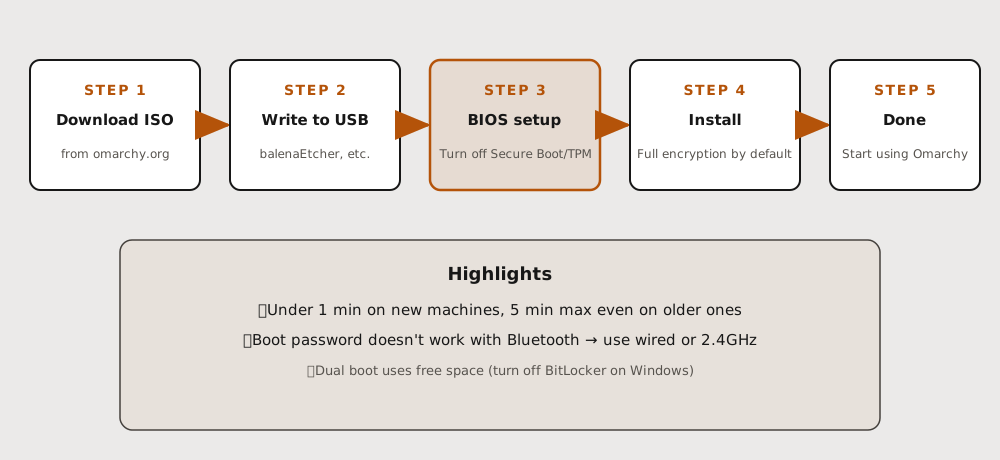 The key is "put the ISO on USB, set the BIOS, then install."It finishes in under a minute on new machines, 5 minutes max even on older ones.
Steps
- Download the ISO: from omarchy.org (or GitHub Releases)
- Write to USB: balenaEtcher (Mac/Windows) or caligula (Linux) to make a bootable USB
- Turn off Secure Boot / TPM in BIOS: required for Omarchy to install (they're Microsoft security schemes)
- Install: choose full-disk or free-space (dual boot). Full-disk encryption is the default
- Done: reboot and start Omarchy
Notes
- A Bluetooth keyboard can't enter the boot password → use a wired or 2.4GHz keyboard
- Back up important data before installing (full-disk wipes the selected drive)
- Existing users can upgrade via
Update > OmarchythenUpdate > Omarchy to Quattro
A "translation guide" for Mac / Windows users
Your ingrained habits translate to Omarchy like this:
| Mac / Windows | In Omarchy | What it does |
|---|---|---|
| Cmd / Windows key | Super key (Windows key) | Anchor for almost every hotkey |
| Spotlight / Start menu | Super + Space | Launch apps, settings, install software |
| Dock / desktop icons | None (hotkeys & menu) | Terminal is Super + Return |
| Drag & arrange windows | Automatic tiling | Windows never overlap |
Summary: who is it for?
Omarchy is a good fit if you:
- Are a developer: a terminal-first, tiling-WM, Neovim-centered workflow feels great
- Appreciate beauty and a hand-tuned system: heavy emphasis on theme and aesthetics
- Like DHH / 37signals' philosophy: the "omakase" way of computing
On the other hand, if you don't want to touch config files or prefer the familiarity of Windows/macOS, it's not for you. Omarchy deliberately embraces the "Linux-ness" of it all.
This article is based on Omarchy's official manual and GitHub info. For details, see The Omarchy Manual.
Share this article
Related articles
Aug 24, 2026
Omarchy Quattro Plugin Marketplace Guide 2026: Customize Your Arch Linux Desktop with omarchyplugins.com
Aug 15, 2026
How DHH Rewrote a Python Library in Rust with Claude in One Shot: The Full 11M-Token Process, Explained (2026 Guide)
Jul 5, 2026
Fable Loop Library Complete Guide 2026: Fully Automating Claude Fable 5 with 25 Workflows, Explained for Beginners

Aug 5, 2026
Cloudflare Wallets Complete Guide 2026: The New Payment System Where AI Agents Pay Automatically, Explained for Beginners

Aug 6, 2026
Cloudflare OS Complete Guide 2026: The Open-Source AI Operating System for Your Company, Explained for Beginners
Aug 15, 2026
Use DeepSeek Harness with OpenRouter in 2026: How "Ori" Switches 500+ Models with One Command, Explained for Beginners