文章摘要
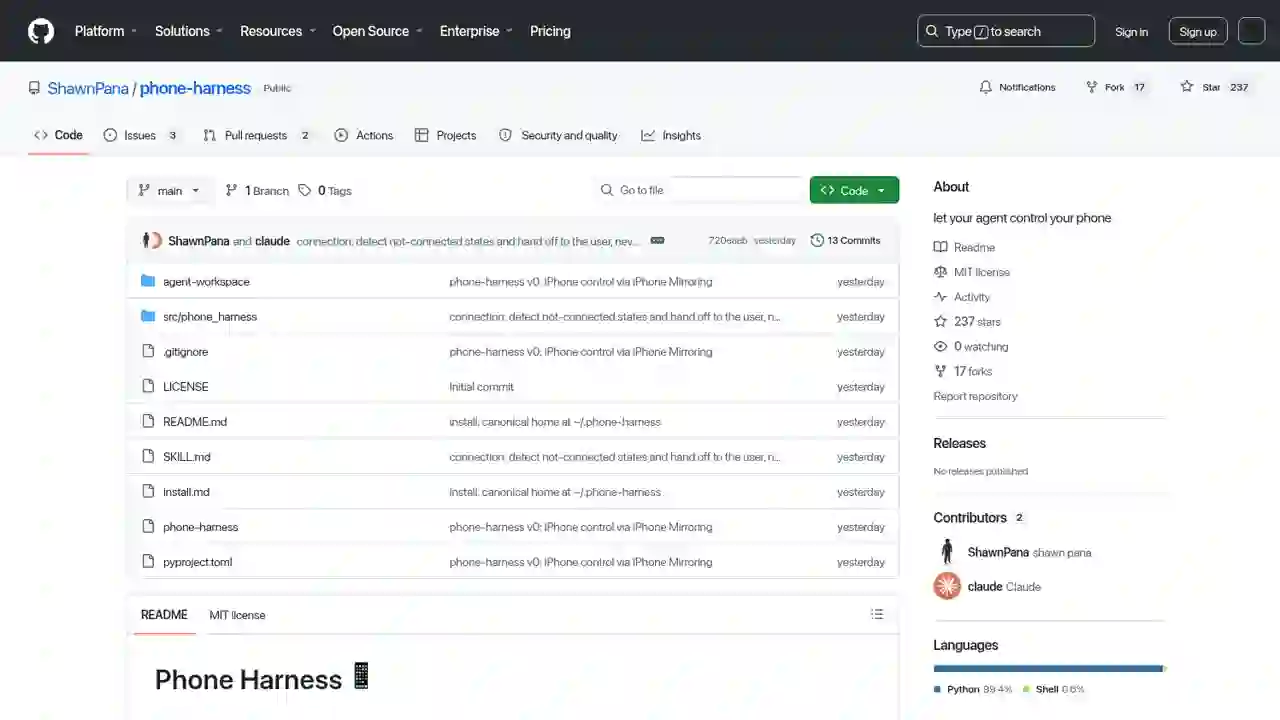
打破这种常识的项目出现了。phone-harness是一款开源工具,可让Claude Code、Codex 等 AI 智能体直接控制你真实的 iPhone。
【2026】用 Claude Code 控制 iPhone!phone-harness 完全指南(附设置步骤)
想用 Claude Code 直接操控手机、又不想越狱——真的能行吗?
「如果能用 Claude Code 操作 iPhone 就好了……」 「iOS 应用自动化总需要 API 或越狱,门槛太高了……」
打破这种常识的项目出现了。phone-harness是一款开源工具,可让Claude Code、Codex 等 AI 智能体直接控制你真实的 iPhone。
无需越狱、无需 API、无需 Xcode、无需 WebDriverAgent。它通过 macOS 的「iPhone 镜像」功能,像真人一样操作 iPhone。在 X 上获得了 2,400 多个赞,在 GitHub 上获得了 179 颗星。
本文将面向初学者,完整讲解 phone-harness 的原理、设置方法和使用方法。
本文你能了解到什么
- phone-harness 是什么(能做什么)
- 为什么「无需 API・无需越狱」就能操作
- 设置步骤(附官方设置提示词)
- 实际用法(代码示例)
- 做不到的事・注意事项
phone-harness 是什么?
phone-harness 是一个薄薄的连接层,将 LLM(AI 智能体)直接连接到你的真实 iPhone。
主要特点
- 像真人一样自动操作 iOS 应用
- 原生 iPhone 控制 → 无需 API・无需越狱
- 连接一次,随时控制
- 设置只需 1 个提示词
开发者是 Shawn Pana(@shawn_pana)。采用 MIT 许可证开源,发布在 GitHub 上。
为什么「无需 API・无需越狱」就能操作
秘密在于macOS 的「iPhone 镜像」功能。
macOS Sequoia 及更高版本的 iPhone 镜像,会把 iPhone 的屏幕显示为 Mac 窗口,并将Mac 上的鼠标・键盘输入作为触摸操作转发给 iPhone。
phone-harness 直接利用了这一机制。
3 个基本动作
| 动作 | 原理 |
|---|---|
| 看(See) | 截取镜像窗口,用 Apple 的 Vision 框架 OCR 识别屏幕上的文字和坐标。相当于「穷人的 DOM」 |
| 操作(Act) | 发送 HID 级别的 CGEvent。支持点击、长按、拖拽、轻扫、滚动、文字输入 |
| 确认(Verify) | 操作后再次截图。在没有 DOM 的世界里,「截图就是真相」 |
设置步骤(1 个提示词搞定)
第 1 步:粘贴设置提示词
将下面的提示词直接粘贴到 Claude Code(或 Codex)中:
Set up phone-harness for me. Clone https://github.com/ShawnPana/phone-harness
into ~/.phone-harness (its canonical home) and read `install.md` first to install
it and connect it to my real iPhone
through the macOS iPhone Mirroring app — install it so `phone-harness` is a
command on my PATH, and register it as an agent skill named phone-harness using
`phone-harness skill` as the body, so you reach for it automatically. Then read
`SKILL.md` for normal usage, and always read `src/phone_harness/helpers.py`
because that is where the functions are. Whenever you capture or verify the
screen, activate the iPhone Mirroring window so I can see what you're doing on
the phone.

Setup needs two things only I can do: pairing iPhone Mirroring with my phone
once, and granting the terminal Accessibility + Screen Recording in System
Settings — walk me through those and wait for me. Verify with
`./phone-harness --doctor`.

After it's installed, as a quick demo that interaction works, go to my Home
Screen and — if the phone is connected and unlocked — ask me whether you should
open the Weather app as a harmless test; only open it if I say yes. If the
session is paused or the phone is locked, just tell me the doctor status instead.
第 2 步:只有你能做的 2 项设置
智能体会自动处理大部分事情,但这 2 项需要物理操作:
| 设置 | 内容 |
|---|---|
| iPhone 镜像配对 | 首次配对需要在真机 iPhone 上进行操作 |
| 授予终端权限 | 在「系统设置 → 隐私与安全性」中允许「辅助功能」和「屏幕录制」 |
- 辅助功能: 点击、按键输入需要(立即生效)
- 屏幕录制: 查看屏幕需要(终端重启后生效)
第 3 步:运行检查
./phone-harness --doctor
会自动检查所有权限和连接是否正常。
使用方法
基本操作示例
phone-harness 是一个从标准输入执行 Python 脚本的 CLI,已预置辅助函数。
./phone-harness <<'PY'
open_app("Notes")
tap_text("New Note")
type_text("hello from the harness")
print([o["text"] for o in ocr()][:10])
PY
这个示例会打开备忘录应用 → 点击新建笔记 → 输入文字 → 读取屏幕上的文字,全部自动完成。
日常使用流程
日常使用时,SKILL.md 会被注册为智能体技能,Claude Code 会自动调用 phone-harness。
智能体的工作流程:
● agent: wants to open Weather
│
● ocr() → "Weather" at (400, 468)
│
● tap(400, 468) → wait_stable() → ocr() confirms the forecast
✓ done
智能体自主运行「看 → 操作 → 确认」的循环。
架构(内部构成)
| 文件 | 作用 |
|---|---|
| SKILL.md | |
| install.md | |
| src/phone_harness/mirror.py | |
| src/phone_harness/ocr.py | |
| src/phone_harness/helpers.py | |
| src/phone_harness/admin.py | |
| agent-workspace/agent_helpers.py |
镜像传输是无状态的(每次重新查询窗口坐标和截图),所以不需要守护进程。每次执行都是自包含的。
做不到的事・注意事项
- 仅限 1 台 iPhone・1 个会话: 解锁物理 iPhone 时镜像会暂停
- 不支持多点触控: 无法进行捏合操作
- 不支持相机・Face ID 流程: 需要人脸识别的操作无法完成
- DRM 视频显示黑屏: 受版权保护的内容无法显示
- OCR 只能看到「文字」: 没有标签的图标需要截图 + 视觉模型
- 需要 macOS Sequoia 或更高版本: 以 iPhone 镜像可用为前提
- 早期项目: 目前是 v0 阶段,实际使用需要自行调整和测试
总结
phone-harness 在无需越狱、无需 API 的情况下,实现了「AI 智能体控制自己的 iPhone」这一未来。
- 组合使用iPhone 镜像 + OCR + CGEvent这些 macOS 内置功能
- 设置只需 1 个提示词(只需自己完成配对和权限)
- 通过看 → 操作 → 确认循环实现自主操作
- 以 MIT 许可证在 GitHub 开源(github.com/ShawnPana/phone-harness)
- 还没有 Android 版(评论区已有需求)
想「把 iPhone 的操作也交给 Claude Code」的人,这正是期待已久的工具。先从把官方设置提示词粘贴到 Claude Code、做一次打开天气应用的测试开始吧。
相关文章
相关文章
2026年8月9日
【2026】Learn Claude Code 完全指南!20 个会话从零打造自己的 AI 智能体的免费学习网站
2026年7月5日
【2026】Fable Loop Library 完全指南!用 25 个工作流让 Claude Fable 5 完全自动驾驶(面向初学者)

2026年6月22日
【2026】Hermes Agent 完全指南!Nous Research 最强开源 AI 智能体的深度解读
2026年9月29日
【2026 年】T3 Code 是什么?用手机操作 AI 编程智能体的免费应用
2026年7月15日
【2026】scroll-world 完全指南!用 Claude Code/Codex 自动生成「滚动 3D 世界」的革命性智能体技能
2026年8月25日
【2026】AgentSky 是什么?用一个 API 在云端运行 Claude Code、Codex、Hermes 的「智能体版 OpenRouter」完全指南