Summary
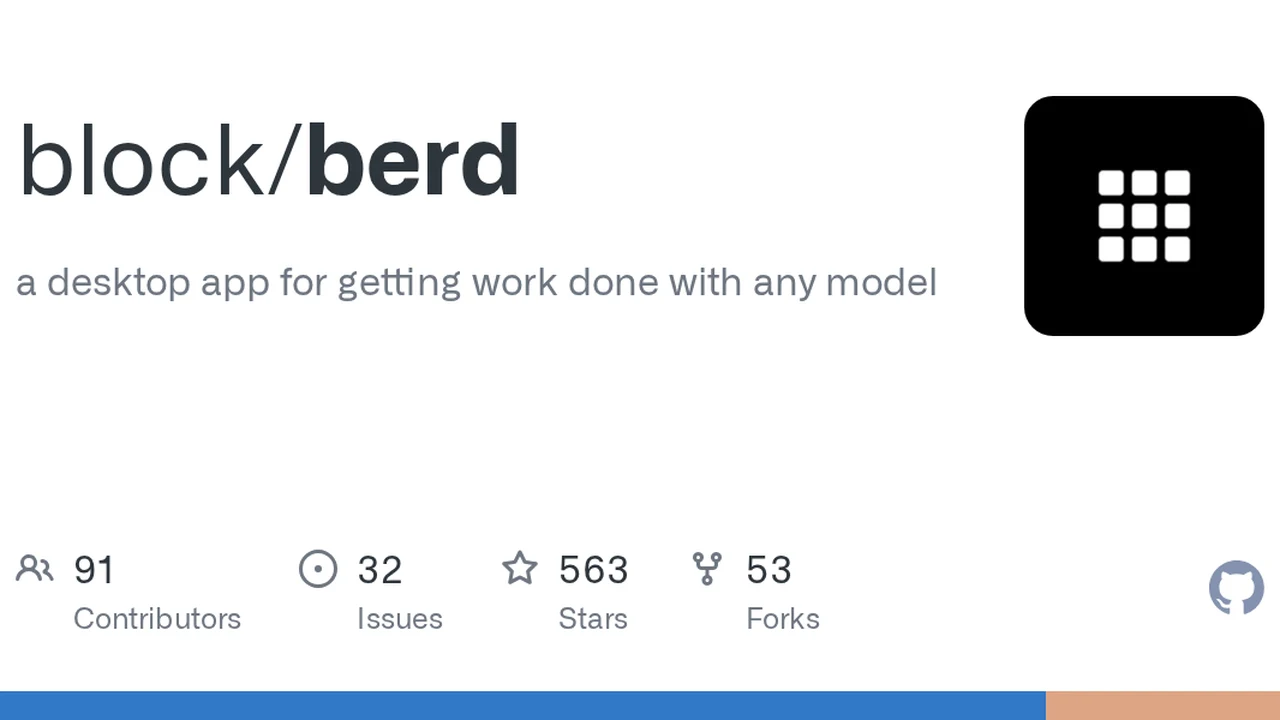
Berd is an open-sourced AI-agent desktop app that Block — the company behind Square and Cash App — uses as its #1 internal AI tool. It lets you build a "dream team" of agents: assign each one a character (personality) and role, with free choice of models and harnesses. It hit 640K views on X and gained 563 stars within 3 days of launch.
Berd Complete Guide 2026: Block's Open-Sourced #1 Internal Tool for Building Your "Dream Team" of AI Agents
"I want to give multiple AI agents roles and have them collaborate in one place…"
"Using AI agents one at a time in separate tools is tedious..." "I use Claude Code and Codex, but I want to give multiple agents roles and have them work as a team..."
A desktop app that answers these needs is going viral on X.
TL;DR: Berd is an open-sourced AI-agent desktop app that Block — the company behind Square and Cash App — uses as its #1 internal AI tool. It lets you build a "dream team" of agents: assign each one a character (personality) and role, with free choice of models and harnesses. It hit 640K views on X and gained 563 stars within 3 days of launch.
This article fully explains what Berd is, why it matters, what you can do on berd.xyz, and how to actually use it — in beginner-friendly language.
What you'll learn
- What Berd is (TL;DR)
- Why it went viral on X (the 640K-view story)
- What you can do with Berd (key features)
- What berd.xyz offers
- System architecture (Tauri + React + Goose + ACP)
- How to use it (install → build an agent team)
- The bundled agents (characters)
- Honest downsides & cautions
- FAQ
What is Berd? 3-line summary
| Item | Detail |
|---|---|
| Developer | Block (parent of Square & Cash App, founded by Jack Dorsey) |
| Type | AI-agent desktop app (macOS / Windows / Linux) |
| License | Apache-2.0 (free for commercial use, modification) |
| Tech | Tauri 2 + React 19 + Goose backend (ACP WebSocket) |
| Released | August 18, 2026 (v0.6.2) |
| Stars | 563 in 3 days · 53 forks |
| Concept | "Less chatting, more building." |
Berd is a tool for managing and orchestrating multiple AI agents in one desktop app.
- Give each agent a "character" and "role"
- Free choice of models and harnesses (BYO: Bring Your Own)
- Conversations, context, and files are stored locally on your PC
- Work in projects by linking folders
It's an app for building "a team of AI agents" on your own machine.
Why did it go viral on X? (the 640K-view story)
On August 18, 2026, Block engineer @hams (John Sullivan Hamilton) posted:
Today we open sourced our no 1 used internal tool, berd. An agent where you can byo harness/models while keeping your work and context in one place, in an unhinged environment where you can build your dream team of agents. Try it out at https://berd.xyz
The post gained 640K+ views and 1.2K+ likes.
Three reasons it grabbed attention:
- A proven company's "#1 internal tool" goes public
- Not a demo — a tool Block actually uses daily to run Square/Cash App
- The "character" design is distinctive
- Agents come with odd, cute characters (Gloopies) with animations
- Meme reactions followed: "Berd changed my life. I used to be a JSON file."
- A unique "unhinged" positioning
- The gap between a serious enterprise tool and playful character design became the talking point
What can you do with Berd? (key features)
1. Build a "team" of agents
Berd's biggest feature: assign roles to multiple agents and use them as a team.
- Set a "character" per agent (name, personality, avatar)
- Assign skills, tools, and projects per agent
- Example: Coder (main) / Architect (design) / Reviewer (code review) / Debugger (debugging specialist)
- See every agent's activity in one screen

2. Free choice of models and harnesses (BYO)
Berd is not locked to any model or framework.
- Models: Claude, GPT, Qwen, local models (Ollama, etc.) — anything
- Harnesses: Goose (default), Claude Code, Codex, OpenAI-compatible APIs
- Native ACP (Agent Communication Protocol) support for connecting various agents
Mix freely: "this model is great at coding → Coder", "use a local model → Reviewer."
3. Local-first (data stays on your PC)
- Chat history, context, and files are all stored locally
- Nothing is sent to the cloud (privacy)
- Workable offline (except model connections)
4. Project management & context continuity
- Link folders per project (multi-Git-folder support)
- Sessions, history, and navigation make it easy to resume work without rebuilding mental state
- "Design for continuity" is a stated design principle
5. MCP server connections
- Add MCP (Model Context Protocol) servers
- Grant agents access to external services
- Connections are grouped into company-managed services and local MCPs
6. Share agents
- Export agent cards as ZIP / PNG / Markdown
- ZIP keeps instructions and settings intact when shared via Slack
- Share good agent setups with teammates
What does berd.xyz offer?
Berd's official site (https://berd.xyz) is a simple landing page with the tagline "Less chatting, more building."
| Item | Detail |
|---|---|
| Tagline | Berd — Less chatting, more building. |
| Description | "Berd is a weird, playful desktop app for building with AI agents." |
| Main purpose | App download, introduction, and information |
| Downloads | Installers for macOS / Windows / Linux |
| Operator | Builder Lab (links to app.builderlab.xyz) |
The site's main role is "the front door to the app."
- Get installers for each OS
- A concise explanation of the concept (a tool for building with AI agents)
- Detailed docs live in the GitHub repo (README / docs/)
It's not a place where you "do work" — the point is downloading the app and using it on your PC. The center of information is the GitHub repository.
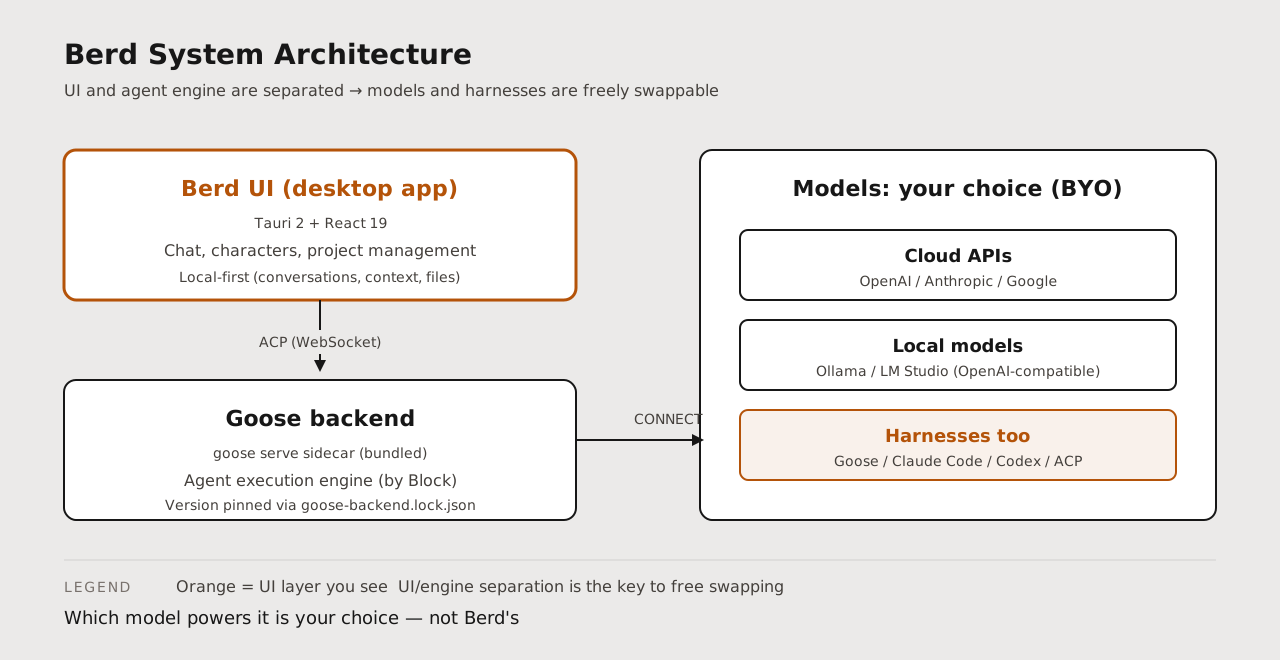
System architecture (Tauri + React + Goose + ACP)
Berd's tech stack is lightweight and modern.
| Component | Tech | Role |
|---|---|---|
| UI framework | Tauri 2 + React 19 | Lightweight native desktop app (web tech) |
| Agent backend | Goose (goose serve sidecar) | Agent execution engine (by Block) |
| Protocol | ACP (WebSocket) | Agent Communication Protocol — standard agent↔UI communication |
| Build | just + pnpm + Rust | just setup / just dev / just bundle |
| Versioning | goose-backend.lock.json | Pins the bundled Goose backend commit |
Key point: Berd bundles "Goose," an agent execution engine, and communicates over ACP (Agent Communication Protocol). Because the UI (Berd) and the agent engine (Goose) are separated, you can freely swap models and harnesses.
How to use it (install → build an agent team)
Step 1: Install
- Go to https://berd.xyz
- Download the installer for your OS (macOS / Windows / Linux)
- Install and launch
※Linux: AppImage (~207MB). macOS: dmg (~145MB). Tauri-based, so it runs light.
Step 2: Configure a model
Set up a provider on first launch.
- Cloud APIs: OpenAI, Anthropic, Google, etc.
- OpenAI-compatible APIs: local models (Ollama, LM Studio, etc.)
- Enter and save your API key
Step 3: Choose or create agents (characters)
Berd ships with 7 agents:
| Agent | Role |
|---|---|
| Berdy | Onboarding guide. The default agent for your first chat |
| Agt Builder | Helps build and configure agents |
| Choosey | Helps with choices and decisions |
| Copycat | Helps with copy and writing |
| Pushback | Provides pushback and critical viewpoints |
| Tinker | Helps with prototyping and experiments (Home canvas) |
| Wildcard | Handles general/free-form tasks (Home canvas) |
You can also create your own agents.
- Set name, role description, avatar
- Assign skills, tools, projects
- Specify a model per agent
Step 4: Create a project and start working
- Link folders to a project (multiple Git folders supported)
- Start a chat and delegate work to agents
- Watch agent activity alongside your work
Step 5: Collaborate as a team
Use the right agent per task — "coding → Agt Builder types", "review → Pushback types."
- Switch chats per agent
- Share agent cards via Slack for reuse
Downsides & cautions
Berd is innovative, but it has real limitations today.
1. Almost no Japanese documentation
- New release, so Japanese guides are nearly nonexistent
- Docs are English-only
- This article is one of the earliest Japanese explainers
2. Participation is issue-only
- External pull requests are not accepted (auto-closed)
- Participation = filing well-formed issues (bug reports, suggestions)
- May disappoint people who want to write code
3. Dependency on the Goose backend
- The agent engine depends on Goose
- Version is pinned via goose-backend.lock.json; updates wait on Block's PRs
- Custom harnesses work, but the default is Goose-centric
4. Enterprise builds are a separate channel
- The repo is the "public distribution" build
- Enterprise distributions ship via private orchestration (provider-managed)
- General users use the public repo build
5. App size is large-ish
- Linux AppImage ~207MB, macOS dmg ~145MB
- Necessary because Goose backend is bundled, but installation takes time
Questions Readers Ask
Q1. How is Berd different from Claude Desktop / Cursor?
The biggest difference is multi-agent team operation and free model/harness choice. Claude Desktop centers on Anthropic models; Cursor is editor-integrated. Berd is a workspace for agent teams: any model, any harness, multiple agents with roles.
Q2. Is it free?
Yes. Apache-2.0 — the app is free and commercial use is allowed. Model API costs (OpenAI, Anthropic, etc.) are separate. With local models (Ollama), model costs are zero.
Q3. Does it support Japanese?
Berd claims i18n support; Japanese is usable. Response quality depends on the model's Japanese ability. Japanese documentation is scarce right now.
Q4. Can I connect local models (Ollama etc.)?
Yes. Connect any OpenAI-compatible local model server. Point OPENAI_BASE_URL etc. at your local server, and you can build a fully local agent team.
Q5. Does it run on a mini PC?
The app itself is lightweight (Tauri). But since the Goose backend and model execution run on the same PC, local models need a GPU. With cloud model APIs, even a CPU-only mini PC runs fine.
Q6. What are agent "characters"?
Berd agents have name, personality, and animated avatars. This isn't just looks — it's how roles and behaviors are clarified per agent. Pushback (critical voice) and Wildcard (free-form) show how character = role assignment.
Summary: Berd is the first tool that makes "a team of AI agents" a daily reality
Berd's essence is "multiple AI agents with roles, working as a team in one place" — realized as a desktop app.
- Multi-agent team operation (character = role)
- BYO (Bring Your Own): free models and harnesses
- Local-first: data stays on your PC
- Project management: folder linking keeps context
- MCP support: connect external services
For anyone thinking "I use Claude Code, but I want multiple agents working as a team with roles," Berd is the most compelling option right now.
A proven company (Block) open-sourcing its daily-driver tool under Apache-2.0, plus a "weird, playful" character world — this points to the future direction of AI agent tools.
GitHub: https://github.com/block/berd Official site: https://berd.xyz
Download it and chat with a bundled agent once. Your "dream team of AI agents" is ready to start moving on your PC.
Related reading
- Hermes Agent Bot Mode Complete Guide 2026: Turn Your AI Agents into a Team of Named Bots with Roles, Models, Memory, and Avatars
- OpenBot Fully Explained 2026: CopilotKit's Open-Source Platform That Gives Each AI Its Own Computer (What Makes It Amazing)
- Fable Loop Library Complete Guide 2026: Fully Automating Claude Fable 5 with 25 Workflows, Explained for Beginners
Share this article
Related articles
Jul 21, 2026
Buzz Complete Guide 2026: Jack Dorsey (Block)'s Open-Source Workspace Where Humans and AI Agents Work in the Same Room
Sep 1, 2026
Spec Kit in 2026: GitHub's Official Toolkit for Spec-Driven Development — Build Better Software with AI Coding Agents

Aug 15, 2026
DeepSeek Harness Desktop Complete Guide 2026: The Command-Free Desktop App for the Official AI Agent, Fully Explained
Aug 24, 2026
OpenConnector Guide 2026: The Open-Source Auth Gateway Connecting 1,000+ SaaS Providers to AI Agents
Jul 30, 2026
Perplexity Numbat Complete Guide 2026: The Open-Source Security Layer That Visualizes & Blocks AI Agent Actions
Aug 6, 2026
Cloudflare OS Complete Guide 2026: The Open-Source AI Operating System for Your Company, Explained for Beginners