Summary
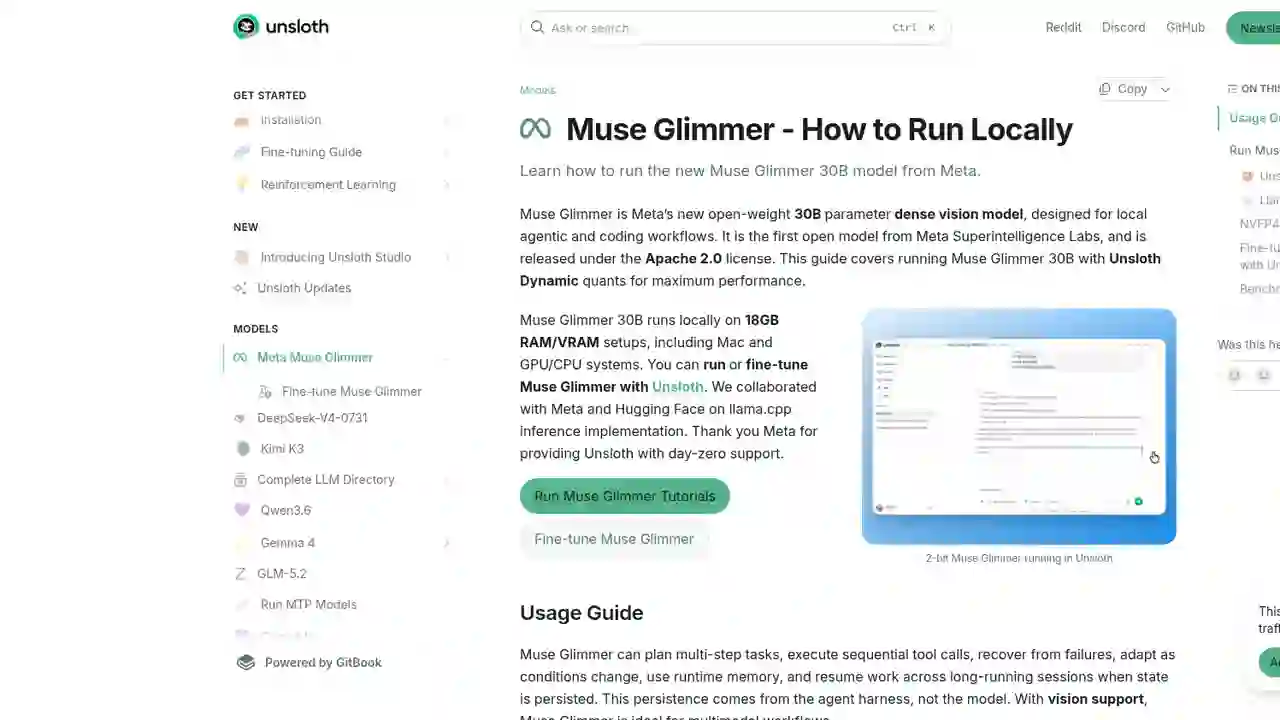
The answer is here. Unsloth, the go-to tool for local LLM operations, has addedday-zero supportfor Meta's new model,Muse Glimmer 30B.
Unsloth Muse Glimmer 30B Guide 2026: Run & Fine-Tune Meta's Agent Model on 18GB RAM
"I want to run Meta's Muse Glimmer on my own PC, but how?"
"I want to know how to pick GGUFs, recommended settings, and fine-tuning..."
The answer is here. Unsloth, the go-to tool for local LLM operations, has addedday-zero supportfor Meta's new model,Muse Glimmer 30B.
With Unsloth's Dynamic quantization, you can run Muse Glimmer on 18GB RAM. Sizes range from 2-bit to 8-bit, so you can pick the best balance for your PC.Fine-tuning is also supported.
In this article, I'll fully explain how to run Muse Glimmer with Unsloth — in beginner-friendly terms.
What You'll Learn in This Article
- Overview of Unsloth's Muse Glimmer support (runs on 18GB RAM)
- Hardware requirements (quick-reference table for 2-bit to 8-bit)
- Recommended settings (temperature, top_p, top_k, context length)
- How to actually run it (Unsloth Desktop, llama.cpp)
- Fine-tuning and benchmarks
What Is Unsloth's Muse Glimmer Support?
Unsloth is an open-source tool specialized in running, accelerating, and fine-tuning local LLMs.
On August 10, 2026, Unsloth announced day-zero supportfor Meta'sMuse Glimmer 30B (Apache 2.0, multimodal, agent-focused model).
Key points
- Runs on 18GB RAM/VRAM: works on Mac, GPU, and CPU systems alike
- Unsloth Dynamic quantization: maximizes accuracy while fitting smaller devices like the RTX 5090
- Both run and fine-tune: everything is done in Unsloth Desktop or the Python library
- Co-developed llama.cpp implementation with Meta and Hugging Face
On X, it's gathering 151,000+ views and 1,600+ likes.
Hardware Requirements: Quick Reference (2-bit to 8-bit)
Muse Glimmer 30B needs about 58GB at full precision (BF16), but Unsloth Dynamic quantization dramatically reduces that.
| Quantization | Model size | Recommended RAM | Hardware examples |
|---|---|---|---|
| 2-bit (UD-Q2_K_XL) | 12–15GB | 18–20GB+ | RTX 4080 |
| 3-bit (UD-Q3_K_XL) | 12–15GB | 20–24GB+ | RTX 4090 |
| 4-bit (UD-Q4_K_XL, NVFP4) | 17–19GB | 24–32GB+ | Mac 32GB |
| 6-bit (UD-Q6_K_XL) | 24–26GB | 32–40GB+ | RTX 5090, Mac 48GB |
| 8-bit (UD-Q8_K_XL) | 31–33GB | 40–48GB+ | Mac 128GB, DGX Spark |
| BF16 (full precision) | 55.7GB | 58GB+ | Mac 128GB, DGX Spark |
Rule of thumb: as long as your total available memory exceeds the size of the quantized model, it runs comfortably. If not, llama.cpp can still run with partial RAM/disk offload, but generation will be slower.
Recommended Settings (Meta's Official Defaults)
| Parameter | Recommended value | Notes |
|---|---|---|
| temperature | 1.0 | Meta default |
| top_p | 0.95 | Maintains diversity |
| top_k | 64 | Narrows choices while staying flexible |
| Context length | 131,072 (up to 262,144) | ~131K tokens by default |
| Reasoning strength | low / medium / high / xhigh | Controllable Effort |
Method 1: Unsloth Desktop (Easiest)
Step 1: Install Unsloth
- Download: get the app from unsloth.ai/download
- macOS, Windows, Linux supported
You can also install via command:
# macOS / Linux / WSL
curl -fsSL https://unsloth.ai/install.sh | sh
# Windows PowerShell
irm https://unsloth.ai/install.ps1 | iex
Step 2: Search & download Muse Glimmer
After first launch, go to the Model hub tab, search for "Muse Glimmer", and download your preferred quantization.
Step 3: Run
Inference parameters are auto-set, but you can change them manually. Context length, chat templates, and GGUF/MLX files are all supported.
Method 2: llama.cpp (CLI)
Here's an example using Unsloth's Dynamic 4-bit (UD-Q4_K_XL).
Build
apt-get update
apt-get install pciutils build-essential cmake curl libcurl4-openssl-dev -y
git clone https://github.com/ggml-org/llama.cpp
cmake llama.cpp -B llama.cpp/build \
    -DBUILD_SHARED_LIBS=OFF -DGGML_CUDA=ON
cmake --build llama.cpp/build --config Release -j --clean-first --target llama-cli llama-mtmd-cli llama-server llama-gguf-split
cp llama.cpp/build/bin/llama-* llama.cpp
Run
export LLAMA_CACHE="unsloth/Muse-Glimmer-30B-GGUF"
./llama.cpp/llama-cli \
    -hf unsloth/Muse-Glimmer-30B-GGUF:UD-Q4_K_XL \
    --temp 1.0 \
    --top-p 0.95 \
    --top-k 64
Fine-Tuning Is Also Possible
With Unsloth, you can fine-tune Muse Glimmer 30B too.
- 2x faster training with 70% less VRAM
- Prepare your own training data for your use case
- See the Fine-tune Muse Glimmer docs for details
Benchmarks: The Strongest Agent Model in Its Size Class
In the benchmarks Unsloth published, Muse Glimmer-30B High Reasoningbeats same-sizeGemma4-31BandQwen3.6-27B in many categories.
| Category | Benchmark | Muse Glimmer 30B | Gemma4-31B | Qwen3.6-27B |
|---|---|---|---|---|
| Agentic | MCP Atlas (Public) | 75.5 | 54.2 | 62.5 |
| Agentic | DeepSearch QA | 74.6 | 61.7 | 71.1 |
| Agentic | Gaia2 | 43.3 | 36.4 | 40.0 |
| Coding | SWE-Bench Pro | 51.2 | 36.9 | 50.2 |
| Coding | SWE-Bench Verified | 76.0 | 66.6 | 77.2 |
| Coding | SciCode | 43.6 | 43.4 | 39.8 |
| Multimodal | Charxiv Reasoning | 78.8 | 77.7 | 78.4 |
| Multimodal | OmniDocBench v1.5 | 75.8 | 72.5 | 77.8 |
| Reasoning | AIME 2026 | 94.7 | 89.2 | 94.1 |
| Reasoning | IFBench | 77.0 | 76.0 | 70.8 |
(Bold indicates the best score. Muse Glimmer leads in most categories.)
Links
- GGUF download: huggingface.co/unsloth/Muse-Glimmer-30B-GGUF
- Official guide: unsloth.ai/docs/models/muse-glimmer
- Fine-tuning: unsloth.ai/docs/models/muse-glimmer/train
- Unsloth download: unsloth.ai/download
- Base model (Meta): huggingface.co/meta-models/Muse-Glimmer-30B
Summary
Unsloth's Muse Glimmer support is the fastest route to starting local AI agents.
- Runs on 18GB RAM: choose from 2-bit to 8-bit for your environment
- Day-zero support: usable in Unsloth from Meta's first day of release
- Run and train: inference and fine-tuning both supported
- Strongest in its class: leads Gemma4 and Qwen3.6 in most benchmarks
If you want to run Muse Glimmer on your own PC, install Unsloth Desktop and search for Muse Glimmer in the Model hub. Your local AI agent will be running in minutes.
Related reading
- Meta Muse Glimmer Complete Guide 2026: The 30B Open-Weight Model That Changes Local AI Agents
- Unsloth Desktop Complete Guide 2026: The First Desktop App to Run and Train Models Locally
- Run Unsloth GGUF Models Locally in Hermes with One Click! Qwen3.8-27B, Qwen3.8-Flash & DeepSeek-V4-Flash Supported (2026)
- Qwen3.8-Flash-Next GGUF Guide 2026: Run It Locally with unsloth — Quantization, RAM & PC Requirements
Share this article
Related articles
Aug 20, 2026
Qwen3.8-27B GGUF Complete Guide 2026: How to Run Unsloth's Version on Your Home PC (File List, How to Choose, Setup Steps)
Jul 28, 2026
Kimi K3 Complete Guide: The 2.8T World's Largest Open Model and the 0.18B Tiny Version That Runs on Potato PCs (2026)
Aug 18, 2026
DeepSeek V4 Flash Abliterated GGUF Review 2026: Run the Uncensored Model Locally & What to Know
Aug 27, 2026
Ornith-1.5-9B-OBLITERATED Guide 2026: Run the Refusal-Free 9B Model Locally
Aug 20, 2026
Qwen3.8-27B Uncensored 12GB GGUF Explained 2026: Ridge-Style Mixed Quantization Hits 37 tok/s on Local Hardware

Sep 5, 2026
Run GLM-5.3-Flash Locally in 2026: The 320B Model That Fits on a DGX Spark or 128GB Mini PC