Summary
On September 3, 2026, Unsloth AI announced that "Unsloth GGUFs can now be run locally in one click via Hermes" — supporting Qwen3.8-27B, Qwen3.8-Flash, DeepSeek-V4-Flash and more. Open Hermes Settings, press "Install runtime", pick a model, and press "Download": cutting-edge open models run on your own machine with no cloud API, no account, and nothing leaving your computer. This article explains the mechanism, supported models, and how to start.
Run Unsloth GGUF Models Locally in Hermes with One Click! Qwen3.8-27B, Qwen3.8-Flash & DeepSeek-V4-Flash Supported (2026)
On September 3, 2026, Unsloth AI announced that "Unsloth GGUFs can now be run locally in one click via Hermes" — supporting Qwen3.8-27B, Qwen3.8-Flash, DeepSeek-V4-Flash and more. Open Hermes Settings, press "Install runtime", pick a model, and press "Download": cutting-edge open models run on your own machine with no cloud API, no account, and nothing leaving your computer. This article explains the mechanism, supported models, and how to start.
Key point: Hermes Agent's built-in Local Models feature automates everything — downloading and managing the inference engine (llama.cpp), picking the right build for your hardware, and handling memory. You just pick a model and press Download. The tedious GGUF setup is gone.
What You'll Learn
- Unsloth AI's announcement (Sep 3, 2026 · 700 likes)
- How Hermes' Local Models feature works
- Models now runnable with one click (Qwen3.8-27B etc.)
- How to start (4 steps)
- Privacy & cost benefits
- Links to existing Hermes / Unsloth guides
Unsloth AI's Announcement (September 3, 2026)
Unsloth AI (@UnslothAI) announced that Unsloth GGUF models can now run locally through Hermes Agent. The post has gathered 700 likes as of September 4.
You can now run Unsloth GGUFs locally in one-click via Hermes! ✨ Qwen3.8-27B, Qwen3.8-Flash, DeepSeek-V4-Flash and more are all supported.
The attached screenshot shows Hermes' settings screen: under "Local runtime", there's an "Install runtime" button, and three models — Qwen3.8-27B, Qwen3.6-35B-A3B, Qwen3.8-Flash — each with a "Download" button. Pressing "Download" starts the model running locally — that's the core of the new feature.
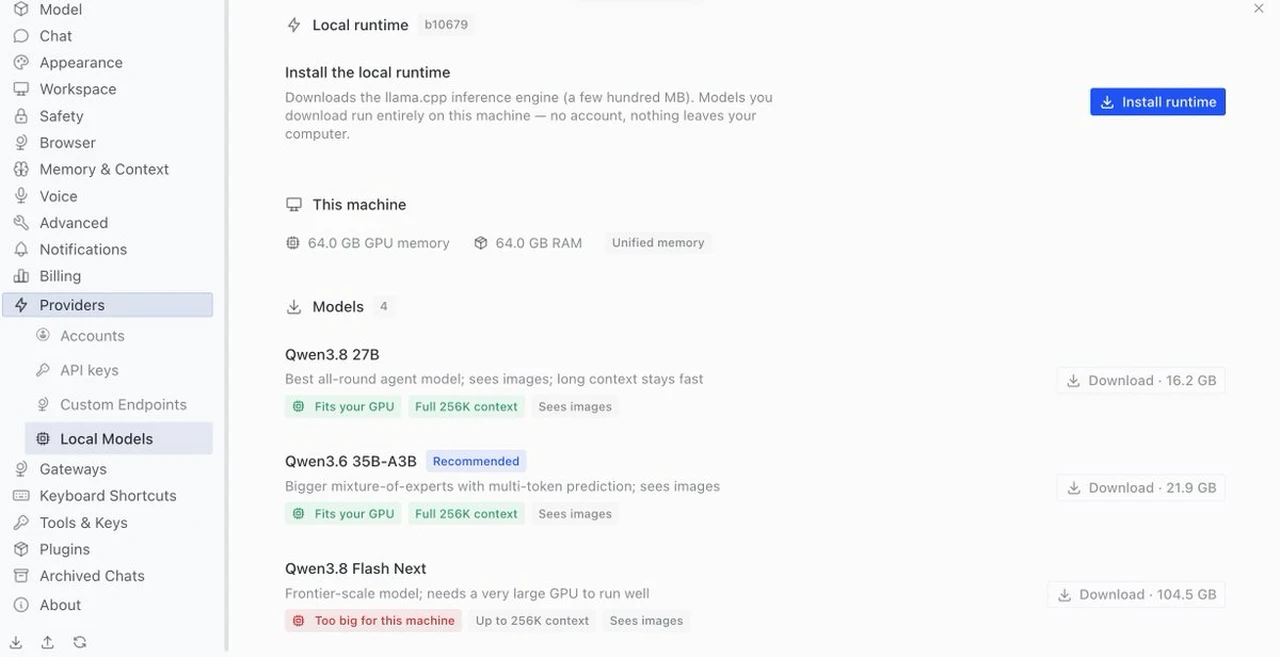 Credit: Unsloth AI / X @UnslothAI (posted Sep 3, 2026)
What Is Hermes' Local Models Feature?
Hermes Agent — the open-source AI agent by Nous Research — includes a Local Models feature. According to Hermes' official docs:
Hermes can run open models entirely on your own machine. It downloads and manages the inference engine (llama.cpp), picks the right build of each model for your hardware, and handles memory so you never configure context sizes, GPU layers, or quantization. You pick a model; Hermes does the rest.
In other words, the formerly complex local setup — installing llama.cpp, understanding quantization, tuning context and GPU layers — is now a one-click operation with zero configuration.
| Aspect | Traditional local setup | Hermes local runtime |
|---|---|---|
| Inference engine | Manually install llama.cpp etc. | Press "Install runtime" (auto, a few hundred MB) |
| Model selection | Understand quant file differences | Pick from catalog & press Download |
| Memory config | Tune context size & GPU layers manually | Automatic (optimized for your hardware) |
| Server management | Start/stop server manually | Starts and stops with Hermes |
| Return to cloud | Tedious to revert config | One click in the model picker |
Models Now Runnable with One Click
Per Unsloth's post, these models are supported in Hermes:
| Model | Size | Features |
|---|---|---|
| Qwen3.8-27B | 16.2GB | Best all-round agent model. Vision, 256K context, runs on 17GB RAM |
| Qwen3.6-35B-A3B | 21.9GB | Large MoE (3B active). Multi-token prediction, vision, 256K context |
| Qwen3.8-Flash | 104.5GB | Frontier-scale. Needs a very large GPU ("too big for this machine") |
Qwen3.8-27B runs on 17GB of total RAM/VRAM thanks to Unsloth's Dynamic 3.0 GGUF quantization. Unsloth calls it "by far the strongest model for its size" — the new default for local AI. DeepSeek-V4-Flash (284B params, 13B active, 1M context) is also supported.
How to Start (4 Steps)
The procedure from Hermes' official docs is refreshingly simple:
- Open Settings: Go to "Settings → Providers → Local Models" (or choose "Run models locally" during onboarding)
- Click Install runtime: Hermes downloads the official llama.cpp build for your hardware (a few hundred MB), verifies it, and keeps it updated
- Pick a model and click Download: Qwen3.8-27B, Qwen3.8-Flash etc. are listed in the catalog
- Click Use: New chats now run on the local model
The server starts and stops with Hermes and survives app restarts. Switching back to a cloud provider is one click in the model picker.
For CLI/headless environments, the managed runtime is configured via the local_runtime section of config.yaml (e.g. backend: auto | cuda | metal | vulkan | hip | cpu, tag: b10362).
Why This Matters: Privacy & Cost
"Models you download run entirely on this machine — no account, nothing leaves your computer." (text confirmed in the announcement screenshot)
- Privacy: Confidential code and data never leave your machine
- Cost: No per-token API fees — just electricity
- Offline: The agent works without a network connection
- Your existing Hermes setup is untouched: Unsloth integration launches from a separate managed home, so current configs are not affected
Summary
The Unsloth GGUF × Hermes Agent integration turns local LLM execution from "an engineer's chore" into "anyone's one-click action".
- Announced by Unsloth AI on Sep 3, 2026 (700 likes)
- Qwen3.8-27B (16.2GB, runs on 17GB RAM), Qwen3.8-Flash, and DeepSeek-V4-Flash supported
- Hermes' Local runtime automates llama.cpp install, quant selection, and memory management
- Done in 4 steps: Install runtime → Download → Use
- No cloud API, no account, no data leaving your PC
Related guides:
- 👉 Hermes Agent Complete Guide — Nous Research's Powerful Open-Source AI Agent
- 👉 Unsloth Desktop Complete Guide — the First Desktop App to Run & Train Models Locally
- 👉 Qwen3.8-27B GGUF Complete Guide — Running Unsloth's Version on a Home PC
Note: Based on the X post (@UnslothAI, Sep 3, 2026), Hermes official docs, and Unsloth official materials. Like counts, model specs, and UI are as of research time. Local execution requires adequate hardware (memory/GPU).
Sources
Share this article
Related articles
Aug 18, 2026
DeepSeek V4 Flash Abliterated GGUF Review 2026: Run the Uncensored Model Locally & What to Know

Aug 16, 2026
Qwen3.8-27B-AEON-ULTIMATE-UNCENSORED Fully Explained 2026: High-Capability Uncensored Model, How to Run Locally
Sep 1, 2026
Qwen3.8-Flash-Next GGUF Guide 2026: Run It Locally with unsloth — Quantization, RAM & PC Requirements
Aug 20, 2026
Qwen3.8-27B GGUF Complete Guide 2026: How to Run Unsloth's Version on Your Home PC (File List, How to Choose, Setup Steps)
Aug 11, 2026
Unsloth Desktop Complete Guide 2026: The First Desktop App to Run and Train Models Locally
Aug 20, 2026
Qwen3.8-27B Uncensored 12GB GGUF Explained 2026: Ridge-Style Mixed Quantization Hits 37 tok/s on Local Hardware