Summary
OpenCode has grown popular as an open-source AI coding agent that runs in your terminal. And in 2026,OpenCode 2.0 (beta) arrived.
OpenCode 2.0 Complete Guide 2026: The Next-Generation AI Coding Agent Where TUI, Desktop, and Web Stay in Sync
"What is OpenCode v2?" "How is it different from V1? How much better is it?"
OpenCode has grown popular as an open-source AI coding agent that runs in your terminal. And in 2026,OpenCode 2.0 (beta) arrived.
The biggest feature of V2 is that TUI, desktop, and web all share the same backend, andstate syncs automatically. Plus, thenew server architecture reduces resource consumption.
In this article, I'll explain what OpenCode 2.0 is and how much better it is than V1, based on the official docs, in beginner-friendly terms.
What You'll Learn in This Article
- What OpenCode 2.0 is
- What makes it great (V1 comparison)
- 3 breaking changes
- Installation
- Basic usage
- How to migrate from V1
What Is OpenCode 2.0?
OpenCode 2.0 is the next-generation version of an open-source AI coding agent you can use in your terminal, desktop, and web.
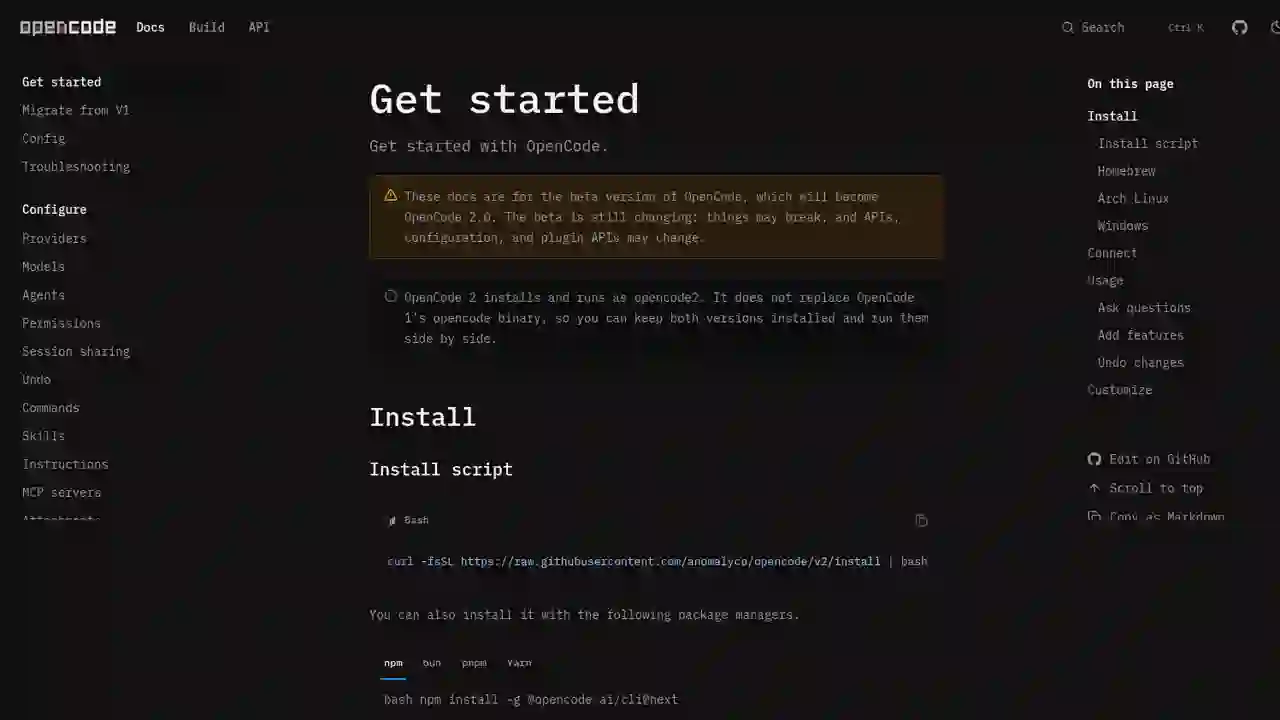
Official description: "OpenCode 2 installs and runs as opencode2. It does not replace OpenCode 1's opencode binary, so you can keep both versions installed and run them side by side."
- Currently in beta (will become OpenCode 2.0)
- Works with any LLM provider by configuring an API key
- Same category as Claude Code and Codex (AI coding agents)
What Makes It Great? (V1 Comparison)
Here's a summary of what makes OpenCode 2.0 better.
| Item | OpenCode V1 | OpenCode 2.0 |
|---|---|---|
| Backend | Tightly coupled to the frontend | Runs an independent server in the background |
| TUI/Desktop/Web sync | Separate | All share the same backend and sync automatically |
| Resource usage | Uses resources to display the UI | Optimized by server architecture; 3rd-party tools can use it |
| Server API | Old API | New more ergonomic API + new clients |
| Plugins | Old plugin API | New plugin API |
| Config file | tui.json(c) (layered) | cli.json (unified; auto-migrated) |
Main strengths
- All UIs share the same backend
- All instances of TUI, desktop, and web share the same backend
- State syncs automatically no matter where you operate
- Runs as a background server
- V2 runs a server in the background
- You and your 3rd-party tools can use OpenCode without it eating up your computer's resources
- New server API and clients
- Adopts a more ergonomic server API
- Use the new clients via the
@opencode-ai/clientpackage
- Works with any LLM provider
- Select any provider with
/connect - Use your preferred model — Claude, GPT, DeepSeek, and more
3 Breaking Changes
V2 has three intentional breaking changes:
- Plugins: switched to a new plugin API
- Server API and clients: switched to new contracts
- TUI config: layered
tui.json(c)→ one globalcli.json(auto-migrated)
Otherwise, V1 functionality is intended to remain compatible.
Installation
Install script (easiest)
curl -fsSL https://raw.githubusercontent.com/anomalyco/opencode/v2/install | bash
Package managers
# npm
npm install -g @opencode-ai/cli@next

# bun
bun install -g --trust @opencode-ai/cli@next

# pnpm
pnpm add -g --allow-build=@opencode-ai/cli @opencode-ai/cli@next

# yarn
yarn global add @opencode-ai/cli@next
The package selects the native opencode2 binary for your platform.
Prerequisites
- A modern terminal emulator (Ghostty, WezTerm, Alacritty, Kitty, etc.)
- API keys for the LLM providers you want to use
Launch
opencode2
※In beta, Homebrew, Arch Linux, and native Windows installs are not yet available (Windows: use WSL).
Basic Usage
1. Connect a provider
/connect
Select a provider in the TUI and set your API key.
2. Ask about your codebase
How is authentication handled in @packages/functions/src/api/index.ts
3. Add a feature
When a user deletes a note, flag it as deleted in the database.
Create a screen that shows recently deleted notes.
From this screen, the user can restore a note or permanently delete it.
4. Undo changes
/undo
Stages a conversation revert and restores your original message (in a Git repo, also restores file changes). Use /redo to restore.
5. Browse models
/models
Browse the providers and models available to your project.
How to Migrate from V1
Let OpenCode migrate for you (recommended)
Ask OpenCode to update your config to the native V2 format.
Migrate my OpenCode configuration, including file-based definitions, from the V1 format to the native V2 format.
Preserve its behavior and all unrelated settings.
Reuse existing config
V2 reads the same config locations as V1.
~/.config/opencode/opencode.json(c)<project>/opencode.json(c)<project>/.opencode/opencode.json(c)
It's designed so you don't need to convert your V1 config.
Verify before relying on it
Start opencode2 in a project and verify your model, provider credentials, agents, permissions, MCP servers, and plugins before relying on the beta for regular work. Keep your V1 setup until you confirm the V2 behavior you need.
Pros and Cons
Pros
- TUI, desktop, and web share the same backend and sync automatically
- Background server optimizes resource usage
- Works with any LLM provider
- Auto-migrates from V1 config; run V1 and V2 side by side
- Open-source and free
- New ergonomic server API and clients
Cons and notes
- Beta: APIs, config, and plugin APIs may change
- 3 breaking changes (plugin API, server API, config format)
- Homebrew and native Windows not yet available
- V1 plugins need porting to the new API
OpenCode 2.0 keeps the TUI, desktop app and web UI on one backend, so a server that stays on makes switching between them easier.
Nous PortalVerified
One account for many models and tools. Handy when you want to run agents like OpenCode without juggling API keys.
Summary
OpenCode 2.0 is a next-generation open-source AI coding agent where TUI, desktop, and web stay in sync on one backend.
- All UIs share the backend and sync automatically
- Background server optimizes resource usage
- Works with any LLM provider
- Auto-migrates from V1; run side by side
- Open-source and free
For anyone "looking for an alternative to Claude Code or Codex" or "wanting a more comfortable V1," OpenCode 2.0 is a strong option.
Reference: OpenCode v2 Docs ・ OpenCode Changelog ・ OpenCode GitHub
Related reading
- Muse Spark 1.3 Is Now FREE on OpenCode! Zen & Go Guide 2026 (Contributor Tier Explained)
- Muse Code Complete Guide 2026: Meta's Terminal Coding Agent & Muse Spark 1.2 Explained
- TypeScript Legend Matt Pocock Calls "/show-me Phenomenal" — the Claude Code Skill That Makes Code Reviews & PR Descriptions Easy to Read (2026)
Share this article
Related articles
Jun 20, 2026
FreeBuff Complete Guide 2026: The AI Coding Agent That Replaces Claude Code & Cursor for Free
Aug 12, 2026
Grok 4.6 Complete Guide 2026: The Latest Frontier-Intelligence Model at the Same Price, Compared with Official Benchmarks
Jul 21, 2026
Laguna S 2.1 Complete Guide: The 118B MoE Open-Weight Coding Model That Beats Models Up to 25× Larger (2026)
Sep 21, 2026
Qwen-Image-2.1 Complete Guide (2026): The First Major Open Model That Generates True Transparent PNGs (RGBA) in ComfyUI
Jun 22, 2026
AI Coding Agent Complete Comparison 2026: Cursor vs Claude Code vs Codex vs Hermes vs Fugu

Jun 22, 2026
Hermes Agent vs Cursor — Full Comparison 2026: Which Should You Choose? Complete Guide to Using Both