Summary
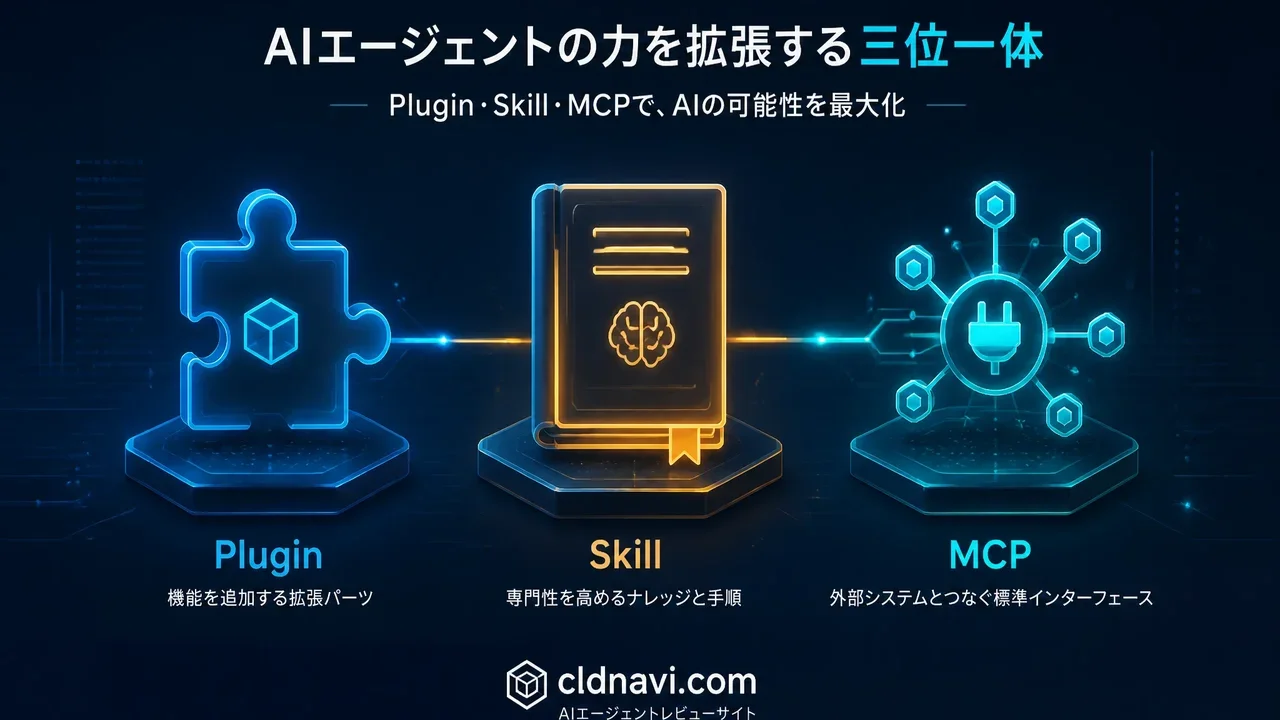
All three are mechanisms for "extending functionality," but their roles, use cases, and creation difficulty are completely different.
Hermes Agent Plugin vs Skill vs MCP: The Complete Guide to Knowing the Difference and When to Use Each (2026 Guide)
"Confused about the difference between Hermes Agent plugins, skills, and MCP — and when to reach for each?"
"I can't figure out the difference between plugins, skills, and MCP in Hermes Agent."
All three are mechanisms for "extending functionality," but their roles, use cases, and creation difficulty are completely different.
- Plugin: custom functionality written in Python. When you want to add your own tools
- Skill: Markdown that stores procedures. When you want to teach the AI "how to do things"
- MCP: the standard protocol for connecting external services. When you want to call tools that already exist
In this article, based on the Hermes Agent official docs and real Discord/X community examples, we thoroughly compare the three mechanisms. You'll see clearly which to choose in which situation.
Official docs:
Bottom Line: The Difference in 3 Lines
| Plugin | Skill | MCP (Model Context Protocol) | |
|---|---|---|---|
| In one sentence | Add your own tools | Teach procedures and memorize them | Connect external services |
| What it is | Python code + plugin.yaml | Markdown file | JSON-RPC server config |
| Location | ~/.hermes/plugins/ | ~/.hermes/skills/ | config.yaml mcp_servers |
| Difficulty | High (Python required) | Low (Markdown is enough) | Medium (edit config files) |
| What you can do | Add tools, hooks, lifecycle handling | Auto-run procedures, iterative learning | External APIs/GitHub/DB/browser operation |
① Plugin — Custom Functionality in Python
Official Definition
"Hermes has a plugin system for adding custom tools, hooks, and integrations without modifying core code." — Hermes Agent Plugins Docs
Plugins are a mechanism for adding your own tools and processing without modifying any of Hermes Agent's core code. Written in Python.
How It Works
Plugins use this folder structure, placed in ~/.hermes/plugins/:
~/.hermes/plugins/my-plugin/
├── plugin.yaml      # manifest (name, version, etc.)
├── __init__.py      # register() — connects schemas and handlers
├── schemas.py       # tool schemas (definitions the LLM sees)
└── tools.py         # tool handlers (executed when called)
What You Can Do
| Feature | Description |
|---|---|
| Add custom tools | Define new tools the LLM can call |
| Hooks | Intercept tool calls with pre_tool_call / post_tool_call |
| Slash commands | Add custom commands in /mycommand form |
| Lifecycle handling | Describe actions at startup, shutdown, and config changes |
Real Example: Converse Mode
Converse Mode, built by Discord user @ibrandis, is a representative Plugin example.
Problem: Hermes Agent starts executing tools the moment it receives instructions. Even with a vague idea, it immediately starts writing files.
Solution: A plugin using the pre_tool_call hook that blocks tool calls until the user says "OK." Achieved with just one plugin and two commands.
What this shows about Plugins:Plugins are the mechanism for"modifying the agent's behavior itself." Use them when you want behavior not covered by core functionality, like Converse Mode.
When to Use
- You want to add your own dedicated tools
- You want to insert processing before/after tool calls (logging, limits, transformation)
- You want native tools for a specific service like WordPress
- You want to try community-shared plugins (like Converse Mode)
② Skill — Procedure Docs Taught in Markdown
Official Definition
"Memory stores facts. Skills store procedures step-by-step instructions for how to do things." — Hermes Agent FAQ
Skills are the mechanism for "memorizing procedures, whereas memory memorizes facts." They are the core of the "self-improvement loop," Hermes Agent's biggest feature.
Skill vs Memory (from the FAQ)
| Comparison | Memory | Skill |
|---|---|---|
| What it stores | Facts (your name, project details, preferences) | Procedures (how to do X, setup steps for Y) |
| How retrieved | Automatically searched by relevance | Agent selects based on the task |
| Format | Short text | Structured Markdown procedure doc |
| Can you write it? | Agent saves automatically | You can write it, and the agent auto-generates it |
What You Can Do
| Feature | Description |
|---|---|
| Store procedures | Save solved problem procedures as Markdown |
| Auto-generation | Hermes Agent auto-creates skill files after solving hard problems |
| Self-improvement | Skills get updated and refined with each use |
| Community sharing | Installable from the Skills Hub (88,000+ skills) |
| Cross-agent sharing | Skills can be shared and reused between agents |
Real Example: 9 AM Email Summary
From Anthony Maio (Substack blogger):
"An agent that grows with you — not marketing fluff. When it solves a hard problem, it literally auto-generates a Markdown skill file. You can write cron in natural language. 'Every business day at 9am, summarize my inbox and post it to Slack.'"
What this shows about Skills:Skills are the mechanism for"the agent learning from experience." Teach it something once, and next time it executes perfectly.
When to Use
- You want fixed procedures run repeatedly (like monthly report generation)
- You want to "teach" the agent new capabilities
- You want to reuse community skills
- You want to automate a workflow that succeeded once
③ MCP (Model Context Protocol) — The Standard Protocol for Connecting External Services
Official Definition
"MCP lets Hermes Agent connect to external tool servers so the agent can use tools that live outside Hermes itself — GitHub, databases, file systems, browser stacks, internal APIs, and more." — Hermes Agent MCP Docs
MCP is the standard protocol for connecting AI agents to external tools, proposed by Anthropic. Hermes Agent can integrate with any external service through MCP servers.
How It Works
MCP operates on a "server" and "client" relationship:
Hermes Agent (MCP client)
  ↓ MCP protocol (JSON-RPC)
MCP server (GitHub / filesystem / database / browser, etc.)
Configuration is done just by writing in config.yaml:
mcp_servers:
  filesystem:
    command: "npx"
    args: ["-y", "@modelcontextprotocol/server-filesystem", "/home/user/projects"]
What You Can Do
| Feature | Description |
|---|---|
| External tool integration | Connect GitHub / Git / filesystem / browser / DB, etc. |
| Automatic tool discovery | Auto-detect and register MCP server tools at startup |
| Filtering | Restrict which tools are exposed per server |
| Nous-approved catalog | One-click install of curated MCP servers from Nous Research |
| Local + remote | Supports both stdio (local) and HTTP (remote) |
Real Example: Operating Windows Chrome from WSL2
A representative MCP use case also in the FAQ:
"If you want to operate Windows Chrome while running Hermes in WSL2, using an MCP bridge is recommended over /browser connect."
With MCP, you can safely operate tools in a different environment from where Hermes Agent runs, through the standard protocol.
When to Use
- You want the agent to operate GitHub repositories
- You want it to query databases directly
- You want to automate browser operations
- You want to integrate internal APIs or custom services
- You want to access local tools from WSL2/remote environments
Comparing the 3: Which Should You Choose?
Decision Flowchart
"I want to add or extend something"
│
├─ "Connect to an external service or tool"
│  └─ ✅ MCP (standard protocol. Just write a config file)
│
├─ "Teach the agent procedures / have it memorize"
│  └─ ✅ Skill (Markdown is fine. Also auto-generated)
│
├─ "Add tools with custom logic"
│  └─ ✅ Plugin (Python required. Highest freedom)
│
└─ "Share functionality between agents in different profiles"
   └─ ✅ Skill or MCP (both shareable)
Comparison Matrix
| Axis | Plugin | Skill | MCP |
|---|---|---|---|
| Skill needed | Python. Intermediate-advanced | Markdown. Beginners OK | YAML config. Intermediate |
| Dev speed | Hours to days | Minutes to tens of minutes | Minutes (just pick from catalog) |
| Freedom | ⭐⭐⭐⭐⭐ (highest) | ⭐⭐⭐ (within procedures) | ⭐⭐⭐⭐ (depends on server) |
| Reusability | Low (local environment dependent) | High (shareable on GitHub) | High (standard protocol) |
| Agent learning target | ❌ | ✅ (auto-generated and improved) | ❌ |
| External service connection | ❌ (implement yourself) | ❌ (can include in procedures) | ✅ (best at it) |
| Execution interception/hooks | ✅ (pre_tool_call etc.) | ❌ | ❌ |
| Community assets | Shared on Discord | 88,000+ in Skills Hub | Nous-approved catalog + GitHub |
Practical: How to Choose in Common Cases
Case 1: "I want to integrate WordPress"
A case also discussed in Grok conversations:
Options:
- MCP: If a WordPress MCP server exists, config alone completes the integration (easiest)
- Plugin: Create a Python plugin that calls the WordPress REST API (highest freedom)
- Skill: Write WordPress operation procedures in Markdown (supplement when MCP/Plugin isn't enough)
Recommendation: Look for an MCP server; if none exists, build a Plugin. Use Skill to supplement operation procedures.
Case 2: "I want to change the agent's behavior, like Converse Mode"
The only option: Plugin
Using the pre_tool_call hook is the answer. Skills and MCP can't change the agent's fundamental "act before thinking" behavior.
Case 3: "Generate a sales report and send it to Slack every morning"
Best solution: Skill + Cron
- Instruct the report generation procedure in natural language → saved as a Skill (auto-generated)
- Run it every morning with a Cron job
- If the report needs internal DB access, connect the DB with MCP
Case 4: "I want automatic GitHub PR review"
Best solution: MCP + Skill
- Connect GitHub with MCP
- Save the PR review procedure as a Skill
- Automatically run the Skill when a new PR arrives
Reference: Official Docs Pages
| Feature | Official docs |
|---|---|
| Plugin overview | Plugins |
| How to build a plugin | Build a Hermes Plugin |
| Built-in Plugins | Built-in Plugins |
| Skills System | Skills System |
| Skills Hub | Skills Hub |
| MCP | MCP (Model Context Protocol) |
| FAQ (Memory vs Skills) | FAQ & Troubleshooting |
Questions Readers Ask
Q: Plugin or MCP — which should I use?
Use MCPto "connect to external services" andPlugin to "add custom logic." MCP just requires writing a config file, so if the goal is connection, MCP is easier.
Q: Are Skills created automatically?
Yes. When Hermes Agent solves a hard problem, it automatically generates a Skill file (Markdown). Users can also create them manually.
Q: Can I use all of them at once?
Yes. Plugin, Skill, and MCP are independent mechanisms, so you can use them simultaneously. For example: "Connect to a DB with MCP, process data with a Plugin, and save the whole flow as a Skill."
Q: I want to try Converse Mode. Where can I get it?
Converse Mode is a community plugin. Ask the author (@ibrandis) directly on Discord, or search GitHub for "hermes-converse-mode." Alternatively, build your own following the official plugin guide.
Q: Is there a WordPress plugin?
No official WordPress plugin exists yet. Approaches for WordPress integration:
- Build a Plugin that talks to the WordPress REST API
- Find (or build) a WordPress MCP server
- Call WP-CLI commands via the Tool Gateway
Q: Can I use all 88,000+ skills in the Skills Hub?
The Skills Hub aggregates skills from multiple registries. There are three types: Built-in (standard), Optional (official options), and Community. Community skills may vary in quality. Check carefully before installing.
Summary: Use the 3 According to Your Goal
Which mechanism to choose for Hermes Agent extensions is determined by "what you want to do."
- Connect to external services → MCP (easiest)
- Teach procedures → Skill (Markdown only)
- Build your own tools → Plugin (Python required, but most powerful)
Combine these three and there's almost nothing you can't do with Hermes Agent. Start with the easiest, MCP, then move to Plugin as needed.
Official docs (user stories): hermes-agent.nousresearch.com/docs/user-stories
Recommended Reading
- Hermes Agent Complete Guide: Setup to Operation
- What Can You Do with Hermes Agent? 262 User Stories
- Hermes Agent vs Cursor: Which Should You Choose?
- Hermes Agent Memory Complete Comparison (All 9)
- Loop Library Complete Guide: 70 Copy-Paste AI Agent Loops
- scroll-world Complete Guide
- Blender MCP with Hermes Agent Complete Guide
- How to Build AI Agents: "Loops" vs "Graphs" Explained
Related reading
- DeepSeek Harness Desktop Complete Guide 2026: The Command-Free Desktop App for the Official AI Agent, Fully Explained
- Hermes Agent Complete Guide 2026: The Most Powerful Open-Source AI Agent by Nous Research
- Hermes Agent Bot Mode Complete Guide 2026: Turn Your AI Agents into a Team of Named Bots with Roles, Models, Memory, and Avatars
Share this article
Related articles

Jul 16, 2026
Blender MCP with Hermes Agent Complete Guide 2026: AI-Powered 3D Modeling for Beginners — Full Setup Walkthrough

Jul 4, 2026
Unreal Engine MCP Complete Guide 2026: Using UE5.8 AI Integration with Hermes Agent & Claude Code for Beginners

Jul 13, 2026
Complete Guide to Setting Up OpenRouter MCP with Hermes Agent: Up to 24x Cost Reduction (2026 Guide)

Jun 22, 2026
Hermes Agent vs Cursor — Full Comparison 2026: Which Should You Choose? Complete Guide to Using Both
Jul 14, 2026
【2026】Automating Japanese Startup Lead Research with Codex CLI & Hermes Agent: The Complete Beginner Guide

Aug 15, 2026
What Can You Do with the Digital Agency’s MCP for Administrative Procedures? A Beginner-Friendly Guide to Analyzing 75,000 Government Records with AI (2026)