Summary
For competitive research, ad strategy, and marketing intelligence, the Google Ads Transparency Center is your go-to tool.
Google Ads Transparency Center Complete Guide 2026: See Any Competitor's Ads Instantly by Company Name or URL
"What kind of ads is that company running on Google to attract customers?"
For competitive research, ad strategy, and marketing intelligence, the Google Ads Transparency Center is your go-to tool.
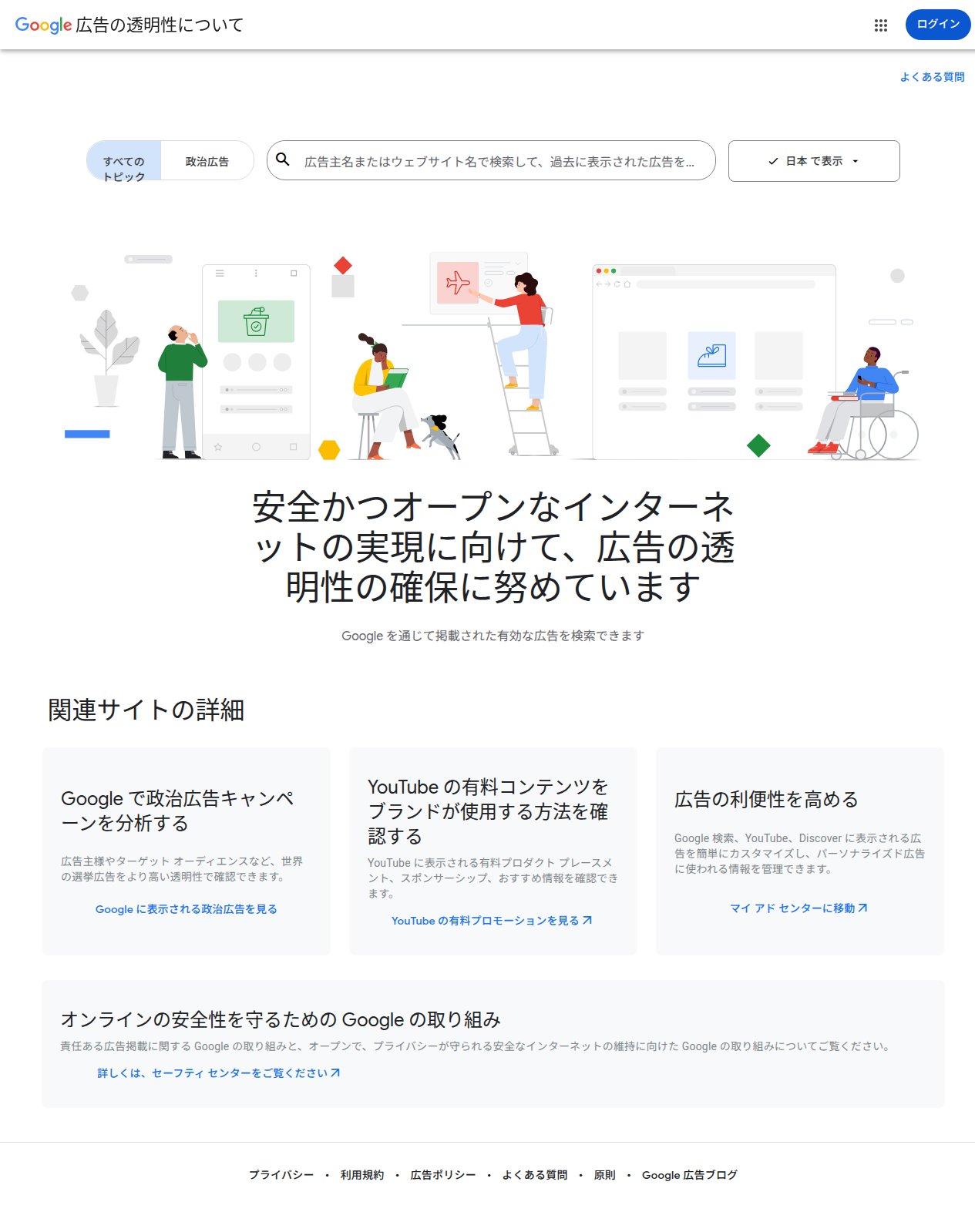
Just enter a company name or website URL, and you can see every ad creative that company has ever run across Google, YouTube, and Discover.
In this article, I'll walk through a real search for "Amazon," confirm that the full ad list appears, and explain — in beginner-friendly terms — what you can learn and how to use it.
By the end, you'll understand:
- What the Transparency Center can do
- The actual search steps (with screenshots)
- How to view and use competitor ads
- The boundary between what's possible and what's not
- Frequently asked questions
What Is the Google Ads Transparency Center?
Google launched this official tool in 2023 to publicly show "who is running what ads."
URL: https://adstransparency.google.com/
It covers ads delivered across Google's entire network — Search, YouTube, Discover, Display, and more. You can filter by region (Japan, US, etc.).
Purpose
As Google puts it:
"We're committed to ensuring ad transparency to help build a safe and open internet."
In short, it's a mechanism that lets users see where the ads shown to them come from and verify the advertiser's identity.
I Actually Searched — Here's What Happened (Amazon Example)
Here's a reproduction of my actual search for "Amazon."
Step 1: Enter a company name in the search bar on the top page
The top page has a prominent search bar that reads: "Search by advertiser name or website to find ads they've previously run." I typed in Amazon.
Step 2: Suggestions appear
As you type, suggestions come up for both advertisers and websites:
| Advertiser Name | Country | Number of Ads |
|---|---|---|
| Amazon Japan G.K. | Japan | ~800,000 |
| Amazon.com.ca, Inc. | Canada | ~33 |
| Amazon.com, Inc. | United States | ~19 |
| Amazon | United States | ~9 |
| Amazon Japan | Japan | ~4 |
You can see the "Verified" badge next to each entry.
Step 3: Click an advertiser to see their full ad list
Clicking "Amazon Japan G.K." opens the advertiser detail page.
Information displayed:
- Official name: Amazon Japan G.K.
- Location: Japan
- Identity verification: Completed
- ~800,000 ads
And then, a scrollable list of every ad creative they've run. For example:
- "Hats · Caps · Large Size · UV Cut 100%…"
- "Disaster Prevention Backpack [Supervised by Disaster Prevention Specialist]…"
- "Water-Cooled Vest · Physical Cooling Wear · Heatstroke Prevention…"
- "Captain Stag Cooler Box…"
- "Binoculars · For Concerts · High Magnification 15x…"
You can see the product name, ad copy, and a link to "Amazon Official Site" — all as actual ads, one by one.
What You Can Learn (What's Possible)
What You CAN See
-
Ad creative (the content itself)
- Headlines, product names, and descriptions used in the ads
- For text ads, you can read the full copy verbatim
-
Advertiser identity
- Official name and location
- Whether they're "Verified"
-
Ad scale
- Total number of ads the advertiser has run (e.g., "~800,000 ads")
-
Platform
- Where the ad appeared — Google Search, YouTube, Discover, or Display (filterable)
-
Time period
- "All time" or filter by a specific date range
-
Ad format
- Filter by text, image, video, and other formats
What You CANNOT See (Limitations)
-
Target audience (who saw the ad)
- Targeting settings like age, gender, and interests are not disclosed
-
Bid prices and budgets
- You can't see how much they're paying
-
Real-time delivery status
- You can't tell if an ad is "running right this moment." It covers past to present ads.
-
Impression and click counts
- Performance metrics like impressions and CTR are not disclosed
-
Return on ad spend (ROAS)
- Obviously not available
Who Should Use It? Practical Applications
Competitive Research (Marketers & Business Owners)
- Understand what products competitors are promoting and with what messaging
- Get inspiration for your own ad copy
Ad Agencies & Consultants
- Understand industry trends for your clients
- Use as reference material: "What are the top players in the industry saying?"
Consumer Protection & Education
- Verify: "Is this ad really from that company?"
- Help identify scam ads
Research & Journalism
- Track shifts in a specific company's ad strategy over time
- Analyze political ad transparency (there's a dedicated Political Ads tab)
How to Use It: Step-by-Step Summary
- Open https://adstransparency.google.com/?region=JP
- Type a company name(e.g., Amazon) orwebsite URL (e.g., amazon.co.jp) into the search bar
- Click the matching advertiser from the suggestions
- On the advertiser detail page, scroll through the ad list
- Filter by time period, platform, and format
Time required: less than a minute.
Questions Readers Ask
Q1: Is it free?
Yes. Basic features work without logging in. (Login required to view age-restricted content.)
Q2: Can I see Japanese companies?
Yes. Use region=JP to search Japanese advertisers. Example: Amazon Japan G.K. showed "~800,000" ads.
Q3: How far back do the ads go?
Ads from 2023 onward (when the service launched) are covered. You can narrow results with the time-period filter.
Q4: Can I see a competitor's budget?
No. Bid prices, budgets, and target audiences are not disclosed. Only creative content and approximate scale (number of ads).
Q5: Can I see YouTube ads too?
Yes. Select "YouTube" in the platform filter to view paid promotions that appeared on YouTube.
Q6: Does it work on mobile?
Yes. Just access it from a mobile browser — it works fine.
Q7: Are political ads separate?
Yes. There's a "Political Ads" tab for analyzing election ads (covers political ads worldwide).
Q8: Can advertisers hide their ads?
Advertisers cannot opt out of appearing in the Transparency Center (with a few exceptions). Public visibility is the default.
Summary — Should You Use the Transparency Center?
Verdict: If you want to see the actual "content" of competitors' ads, this is the ultimate free tool.
- See past ad creatives just by entering a company name or URL
- Use it for competitive research, marketing strategy, and consumer protection
- Completely free · No login required (for basics)
- Japanese companies are included (region=JP)
On the flip side, you might find it lacking if:
- You want target audience, budget, and CTR data (you'll need a paid analytics tool)
- You need real-time delivery data
The Google Ads Transparency Center is a window into the "ad forest." See what your competitors are saying to attract customers — in under a minute.
"Search for valid ads that have been served through Google."
That, in a nutshell, is what this tool is all about.
Information in this article is current as of July 2026. Features and specifications are subject to change without notice. Verify the actual interface at https://adstransparency.google.com/?region=JP.
Share this article
Related articles

Sep 5, 2026
AI Personal Brand Playbook 2026: Become the Authority in Your Niche with 45 Minutes a Week (Content + Distribution + Strategy)
Jun 23, 2026
Blueprint.am Complete Guide 2026: "Claude for Hardware" Auto-Generates Wiring Diagrams, BOMs, and Assembly Instructions

Jul 9, 2026
Cloudflare Drop Complete Guide 2026: Deploy a Website Instantly by Drag-and-Drop — The Revolutionary Tool
Sep 21, 2026
Qwen-Image-2.1 Complete Guide (2026): The First Major Open Model That Generates True Transparent PNGs (RGBA) in ComfyUI
Aug 6, 2026
Cloudflare OS Complete Guide 2026: The Open-Source AI Operating System for Your Company, Explained for Beginners
Aug 9, 2026
Herdr Complete Guide 2026: The New Standard Runtime Where Any Agents Can Talk to Each Other