Summary
Alibaba released ZVec in 2026 — a lightweight, high-speed vector database you can embed directly into your application.
ZVec Complete Guide 2026: Alibaba's "SQLite for Vector Databases" Explained for Beginners
"Want to add vector search to your app but find full database servers too heavy and complicated?"
Alibaba released ZVec in 2026 — a lightweight, high-speed vector database you can embed directly into your application.
Dubbed "SQLite for vector databases," ZVec needs no external server — you can start with a single pip install zvec. Under the hood, it packs the engine that has handled billion-scale vector search in Alibaba's production environments.
In this article, we fully explain ZVec from the basics to real setup and RAG (Retrieval-Augmented Generation) usage, in beginner-friendly terms.
What You'll Learn
- What ZVec is — Alibaba's in-memory vector database fundamentals
- Why it's called "SQLite for vector DBs" — the power of the embeddable approach
- From installation to your first search — a 3-minute Python starter
- Practical use cases — RAG, image search, code search
- How it differs from traditional vector DBs — comparing Pinecone / Weaviate / Chroma
- GitHub repo — how to access the source and join the community
What Is ZVec?
ZVec is an open-source, in-process (embedded) vector database developed and released by Alibaba Group.

Key facts:
- Developer: Alibaba Group
- License: Apache 2.0
- GitHub Stars: 12,800+
- Latest version: v0.5.0 (June 12, 2026)
- Languages: Python / Node.js / Go / Rust / Dart (Flutter)
- OS support: Linux (x86_64, ARM64) / macOS (ARM64) / Windows (x86_64)
- Official site: zvec.org
- GitHub: github.com/alibaba/zvec
Why "SQLite for Vector DBs"?
ZVec's biggest feature: no external server required.
Traditional vector DBs (Pinecone / Weaviate / Qdrant):
Your app → network → vector DB server (separately operated)
ZVec:
Your app (ZVec embedded) → direct memory access
In other words, just as SQLite embeds a relational DB into your app, ZVec embeds vector search into your app.
- No server — no Docker, no cloud
- No config —
pip install zvecthenimport zvec - Zero network latency — search happens in-process
- Low cost — no server operation expenses
Inside ZVec: The Proxima Engine
ZVec's search engine is Proxima, which Alibaba has used internally for over 10 years.
Proxima powers Alibaba's search, recommendation, and advertising systems, processing 1 billion queries per day. ZVec makes this battle-tested engine available to everyone as open source.
Proxima's track record:
- Operated within the Alibaba Group for years
- Processes billion-scale vector search in milliseconds
- Runs across search, recommendation, and advertising systems
Key Features
| Feature | Description |
|---|---|
| Dense & sparse vectors | Supports both Dense Vector and Sparse Vector. Multi-vector queries supported |
| Full-text search (FTS) | Added in v0.5.0. Index string fields with FTS for keyword search |
| Hybrid search | Combines vector similarity + full-text search + scalar filters in one query |
| Filtered search | Combine metadata condition filters with vector search for high-precision results |
| Group search | GROUP BY-style grouped vector search |
| DiskANN index | Disk-based index drastically reduces memory usage. Ideal for large datasets |
| WAL persistence | Write-Ahead Logging ensures zero data loss on crashes or power failures |
| Multi-process concurrent reads | Multiple processes can read the same collection concurrently. Writes are single-process |
What's New in v0.5.0 (June 12, 2026)
ZVec v0.5.0 is a major update adding full-text search (FTS) and hybrid search.
Key additions:
- Full-Text Search (FTS): native full-text search. Search string fields without an external search engine
- Hybrid Retrieval: run vector search + full-text search + scalar filters at once with
MultiQuery - DiskANN index: new disk-based index that keeps memory usage low even with massive data
- Go / Rust SDK: official Go and Rust bindings
- Zvec Studio: visual management tool (browse data and debug queries without code)
- RISC-V support
Installation and Basic Usage
Installation
ZVec works in multiple languages; Python is the easiest.
pip install zvec
Supports Python 3.10–3.14. That's all it takes.
3-Minute Sample
import zvec

# Define a schema
schema = zvec.CollectionSchema(
    name="example",
    vectors=zvec.VectorSchema("embedding", zvec.DataType.VECTOR_FP32, 4),
)

# Create a collection (create database)
collection = zvec.create_and_open(path="./zvec_example", schema=schema)

# Insert documents
collection.insert([
    zvec.Doc(id="doc_1", vectors={"embedding": [0.1, 0.2, 0.3, 0.4]}),
    zvec.Doc(id="doc_2", vectors={"embedding": [0.2, 0.3, 0.4, 0.1]}),
])

# Vector similarity search
results = collection.query(
    zvec.VectorQuery("embedding", vector=[0.4, 0.3, 0.3, 0.1]),
    topk=10
)

# Results are a list of {'id': str, 'score': float, ...}
print(results)
In just 6 lines, you've created a vector database, inserted data, and searched it.
Node.js Usage
npm install @zvec/zvec
const zvec = require('@zvec/zvec');

const schema = new zvec.CollectionSchema({
  name: 'example',
  vectors: { name: 'embedding', dtype: 'VECTOR_FP32', dimension: 4 },
});

const collection = zvec.createAndOpen('./zvec_example', schema);

collection.insert([
  { id: 'doc_1', vectors: { embedding: [0.1, 0.2, 0.3, 0.4] } },
]);

const results = collection.query(
  { type: 'vector', field: 'embedding', vector: [0.4, 0.3, 0.3, 0.1] },
  { topk: 10 }
);
Practical Use Cases
Use Case 1: RAG (Retrieval-Augmented Generation)
ZVec's most popular use is building RAG pipelines with LLMs.
import zvec
from sentence_transformers import SentenceTransformer

# Load an embedding model
model = SentenceTransformer('all-MiniLM-L6-v2')

# Split documents into chunks
chunks = [
    "ZVec is an in-memory vector DB developed by Alibaba",
    "You can install it with pip install zvec",
    "It embeds directly into your app with no external server",
]

# Convert each chunk to an embedding vector
embeddings = model.encode(chunks)

# Define schema (768-dimensional vectors)
schema = zvec.CollectionSchema(
    name="docs",
    vectors=zvec.VectorSchema("embedding", zvec.DataType.VECTOR_FP32, 768),
)
collection = zvec.create_and_open(path="./rag_store", schema=schema)

# Insert documents
for i, (chunk, emb) in enumerate(zip(chunks, embeddings)):
    collection.insert([
        zvec.Doc(id=f"chunk_{i}", vectors={"embedding": emb.tolist()}, fields={"text": chunk})
    ])

# Search with the question embedding
query = "How do I install ZVec?"
query_vec = model.encode([query])[0]
results = collection.query(zvec.VectorQuery("embedding", vector=query_vec.tolist()), topk=3)

# Pass search results to the LLM
context = "\n".join([r.fields["text"] for r in results])
# → Pass context to the LLM to generate an answer
Use Case 2: Image Search
Convert images to embedding vectors and search similar images with ZVec.
from sentence_transformers import SentenceTransformer
import zvec

# Image embeddings with a CLIP model
model = SentenceTransformer('clip-ViT-B-32')

# Vectorize images
image_vectors = model.encode(['cat.jpg', 'dog.jpg', 'car.jpg'])

# Store in ZVec and search similar images
schema = zvec.CollectionSchema(
    name="images",
    vectors=zvec.VectorSchema("embedding", zvec.DataType.VECTOR_FP32, 512),
)
collection = zvec.create_and_open(path="./image_store", schema=schema)

# Search "images similar to a cat photo"
query_vec = model.encode(['a cute cat'])
results = collection.query(zvec.VectorQuery("embedding", vector=query_vec[0].tolist()), topk=5)
Use Case 3: Hybrid Search (v0.5.0)
Combine full-text search and vector search in a single query.
# Hybrid search: vector similarity + full-text search + filter
results = collection.query(
    zvec.MultiQuery([
        zvec.VectorQuery("embedding", vector=query_vec),
        zvec.FtsQuery("title", "vector database"),
        zvec.FilterQuery("price < 100"),
    ]),
    topk=10
)
Comparison with Traditional Vector DBs
| Aspect | ZVec | Pinecone | Chroma | Weaviate |
|---|---|---|---|---|
| Type | In-process (embedded) | Cloud (managed server) | In-process | Hybrid (server-based) |
| Install | pip install zvec | Account + API key | pip install chromadb | Docker or cloud |
| External server | Not needed | Required | Not needed | Required (Docker recommended) |
| Performance base | Proxima (Alibaba-proven) | Proprietary engine | HNSW/lib | Proprietary engine |
| Full-text search | Yes (v0.5.0+) | Partial | No | Yes |
| Hybrid search | Yes | Paid plans only | No | Yes |
| DiskANN | Yes | Not disclosed | No | No |
| License | Apache 2.0 | Proprietary | Apache 2.0 | BSD-3-Clause |
| Pricing | Free (OSS) | Usage-based (paid) | Free (OSS) | Partially paid |
| GitHub Stars | 12.8k | N/A (closed) | 16k+ | 12k+ |
Where ZVec Shines
- Serverless start — no account registration or API key like Pinecone. No Docker either
- Zero network latency — runs in the same process, making search dramatically faster
- Alibaba's proven engine — Proxima handles 1B queries/day
- Multi-language SDKs — official support for Python / Node.js / Go / Rust / Dart
- Rich hybrid search — full-text + vector + filters in one query
When ZVec Isn't the Right Fit
- Ultra-large-scale cluster operation — for 10B+ vectors needing distribution, Pinecone or Weaviate fit better
- A management console is needed — Zvec Studio exists, but it's not as complete as Pinecone's console
- Team-wide shared DB — for sharing across multiple servers, a server-based DB is better
Performance
ZVec publishes benchmarks using the Cohere 10M vector dataset.
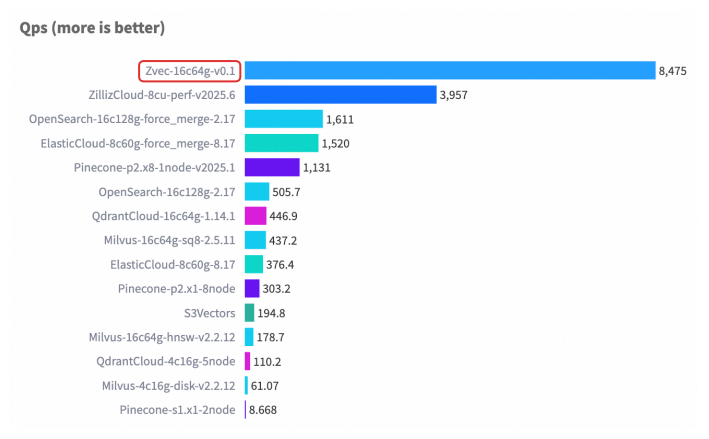
- Millisecond search even at billion-vector scale
- DiskANN index handles large data while keeping memory usage low
- Full benchmark results: official docs
Questions Readers Ask
Q1: Does ZVec support Japanese full-text search?
The FTS feature added in v0.5.0 has a UTF-8-compatible tokenizer, so Japanese full-text search works. However, morphological analysis (MeCab, etc.) is not built in, so advanced Japanese search may require a custom tokenizer.
Q2: What's the difference between Chroma and ZVec?
Both are in-process vector DBs, but ZVec uses Alibaba's Proxima engine — its strengths are large-scale performance and the DiskANN index. Chroma excels at simplicity and lightness. ZVec also has richer multi-language SDKs (Go / Rust / Flutter).
Q3: Is migrating from Pinecone easy?
The APIs differ, but the core vector search concept is the same. The Python SDK is intuitive with a low learning curve. For RAG pipelines, keep your embedding generation as-is and swap only the storage/search layer to ZVec.
Q4: Can I use it in production?
It's based on Proxima, which Alibaba has used internally for years, so reliability is high. Features for production — WAL persistence, multi-process concurrent reads — are all there. That said, as of v0.5.0 it's a relatively new project, so validate thoroughly.
Q5: How much memory does it use?
It depends on the index. DiskANN keeps memory minimal even for large data. Flat or HNSW indexes consume memory proportional to data size.
Q6: Can multiple apps read/write concurrently?
Reads are multi-process.Multiple processes can read the same collection simultaneously.Writes are single-process with exclusive control. For distributed writes, use a server-based DB like Pinecone.
Q7: How do I back up data?
ZVec data is saved as a directory at the path you specify (create_and_open(path=...)). Back up that directory regularly. WAL-based crash recovery is standard.
Q8: Is it free?
ZVec is fully open source (Apache 2.0), so there are zero API costs. No server operation costs either. You only need machine resources to run your application.
Summary
ZVec is Alibaba's lightweight, high-speed in-process vector DB that truly deserves the name "SQLite for vector databases."
Key takeaways:
- One-line install with
pip install zvec, no external server - Alibaba's Proxima engine — millisecond search at billion-vector scale
- v0.5.0 adds full-text search and hybrid search
- Ideal for RAG / image search / code search
- Multi-language: Python / Node.js / Go / Rust / Flutter
- Apache 2.0 — completely free
If you "want to try a vector DB but find Pinecone's account registration annoying" or "don't even want to spin up Docker," ZVec is your best choice.
👉 GitHub repo: github.com/alibaba/zvec 👉 Official site: zvec.org 👉 Docs: zvec.org/en/docs/db/ 👉 Discord community: discord.gg/rKddFBBu9z
Recommended Reading
- Claude Fable 5 Financial Guide: Protecting Your Assets with AI Agents
- Cloudflare Monetization Gateway Complete Guide
- A Fable of Codexes Complete Guide: Building an AI Worker Army Led by Claude
- GPT-Live Complete Guide: OpenAI's Full-Duplex Voice AI
- Using component.gallery to Dramatically Improve AI UI Generation
Related reading
Share this article
Related articles
Jun 18, 2026
Accio Work Complete Guide 2026: Alibaba-Partnered AI Agent Automates Sourcing, Store Building, and Sales
Jul 5, 2026
Fable Loop Library Complete Guide 2026: Fully Automating Claude Fable 5 with 25 Workflows, Explained for Beginners
Jul 16, 2026
QVAC (Tether) Complete Guide 2026: Running AI Locally, Explained for Beginners

Jul 4, 2026
Unreal Engine MCP Complete Guide 2026: Using UE5.8 AI Integration with Hermes Agent & Claude Code for Beginners

Jul 4, 2026
Alibaba Page Agent Complete Guide 2026: The GUI Agent Framework That Lives Inside Your Page

Aug 5, 2026
Cloudflare Wallets Complete Guide 2026: The New Payment System Where AI Agents Pay Automatically, Explained for Beginners