Summary
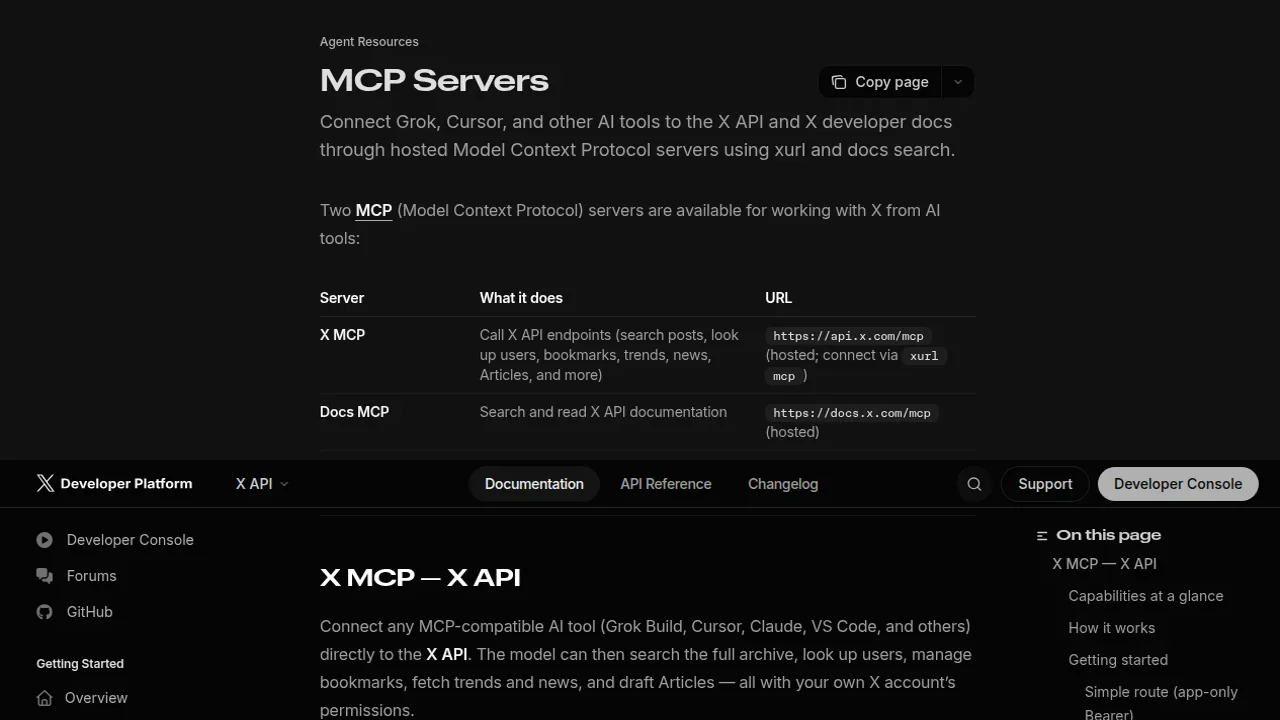
In 2026, X (formerly Twitter) released an official MCP (Model Context Protocol) server. Now AI tools like Grok Build, Cursor, Claude Desktop, and VS Code can call the X API directly.
X (Twitter) Official MCP Complete Guide 2026: Automate Search, Posting & Trend Fetching with AI Agents
"Want to operate X search, posting, and trends directly from an AI agent instead of through the website manually?"
「If only I could operate X data directly from an AI agent…」
In 2026, X (formerly Twitter) released an official MCP (Model Context Protocol) server. Now AI tools like Grok Build, Cursor, Claude Desktop, and VS Code can call the X API directly.
This article explains:
- What MCP is (ultra-beginner friendly)
- The difference between X's 2 MCP servers
- Setup steps (2 routes)
- Configuration for each AI tool
- Practical usage and prompt examples
Official docs: X Official MCP Docs
First: What Is MCP? In 3 Lines
MCP (Model Context Protocol) is a standard protocol connecting AI agents and external services.
An analogy:
- USB-C = any device connects with the same cable (standardization)
- MCP = any AI tool connects to external services the same way (standardization)
Previously you needed separate X plugins for Cursor, Claude, etc. With MCP, one config works across all AI tools.
X MCP Overview: 2 Servers
X officially provides 2 free MCP servers.
| Server | Role | URL | Auth |
|---|---|---|---|
| Search & Trends MCP | Search posts, get trends, user info | https://api.x.com/mcp | Bearer token |
| Post & DM MCP | Create posts, send DMs | https://api.x.com/mcp/post | OAuth 2.0 (xurl bridge) |
Setup: Route 1 (Read-Only: Search & Trends)
1. Get a Bearer Token
Create an app in the X Developer Portal and get a Bearer token.
2. Add MCP to Your Tool
Example (VS Code / Claude Desktop):
{
  "url": "https://api.x.com/mcp",
  "headers": {
    "Authorization": "Bearer YOUR_BEARER_TOKEN"
  }
}
3. Done
Ask your AI: "Search for the latest posts about DeepSeek" — it queries X via MCP.
Setup: Route 2 (Post & DM with xurl)
For posting, use the xurl OAuth bridge:
# Install xurl
npm install -g @xdevplatform/xurl

# Authenticate with your X account
xurl login
Then add the MCP server:
{
  "url": "https://api.x.com/mcp/post",
  "headers": {
    "Authorization": "Bearer YOUR_BEARER_TOKEN"
  }
}
What You Can Do (Examples)
- Search posts: "Find posts mentioning #AI agents in the last hour"
- Get trends: "What are today's trending topics in Japan?"
- Post: "Post: Just launched our new product! 🚀"
- Send DMs: "DM @username our pricing page"
- User research: "Get info on @nousresearch"
Practical Prompts
Use X MCP to search for the top 10 posts about "local AI" from the last 24 hours,
and summarize the main sentiment.
Get today's worldwide trends, filter to tech-related ones,
and suggest which to write a blog post about.
Official Links
- Official docs: X Official MCP Docs
- xurl (OAuth bridge): GitHub - xdevplatform/xurl
Related Reading
- Claude Fable 5 Financial Asset Protection Guide
- Cloudflare Monetization Gateway Complete Guide
- A Fable of Codexes Complete Guide
- GPT-Live Complete Guide
- component.gallery Guide
Related reading
Share this article
Related articles
Jun 18, 2026
Accio Work Complete Guide 2026: Alibaba-Partnered AI Agent Automates Sourcing, Store Building, and Sales

Jul 4, 2026
Unreal Engine MCP Complete Guide 2026: Using UE5.8 AI Integration with Hermes Agent & Claude Code for Beginners

Aug 11, 2026
Grok Bot Complete Guide 2026: How to Use "Bots," the AI Teammates You Can Delegate Real Work To

Aug 15, 2026
What Can You Do with the Digital Agency’s MCP for Administrative Procedures? A Beginner-Friendly Guide to Analyzing 75,000 Government Records with AI (2026)

Aug 15, 2026
DeepSeek Harness Desktop Complete Guide 2026: The Command-Free Desktop App for the Official AI Agent, Fully Explained

Aug 12, 2026
OpenSEO Complete Guide 2026: How to Use the Open-Source Alternative to Semrush and Ahrefs, Plus DataForSEO Integration