Summary
An AI project that went viral in 2026 solves exactly this problem: a system that counts potatoes on a conveyor belt in real time using just one annotated frame. It's not an LLM, and it's not a robot — it's a great example oflocal AI that actually works in the field, gathering 1,700+ likes on X.
Count Potatoes with AI in 2026: A Low-Cost Farm Counting System Built with SAM 2 + YOLO11 nano
"Tired of counting harvested produce one by one and wondering if local AI can really automate it on a budget?"
"Counting every harvested potato one by one is exhausting..." "If I could automatically count the produce moving on the conveyor, how much easier would shipping become?"
An AI project that went viral in 2026 solves exactly this problem: a system that counts potatoes on a conveyor belt in real time using just one annotated frame. It's not an LLM, and it's not a robot — it's a great example oflocal AI that actually works in the field, gathering 1,700+ likes on X.
In this article, I'll explain how this system works and how farmers and food-processing sites can use it, in beginner-friendly terms.
What You'll Learn in This Article
- Why the potato-counting system is so impressive
- The roles of SAM 2 and YOLO11 nano
- What the GitHub code does and how to run it
- Practical ideas for farms and food processing
- Things to watch out for when adopting it
Why It's Impressive: Production-Ready from Just One Annotation
Normally, training an AI object-detection model requires manually labeling hundreds to thousands of images. That has always been the biggest barrier to real-world adoption.
What makes this project special is how dramatically it shortens that process:
- Only one frame needs annotation
- SAM 2 (Meta's segmentation model) auto-generates labels
- YOLO11 nano (ultra-lightweight model) is trained
- The trained model works across the whole video, enabling real-time counting
- Production ready
As the viral post put it: "While everyone is racing to build trillion-parameter models, the fastest wins in manufacturing are systems like this." Exactly — small, fast, and cheap is what wins in the field.
How It Works: A Two-Stage Pipeline (SAM 2 → YOLO11 nano)
The Role of SAM 2 (Auto Label Generation)
SAM 2 is Meta's image and video segmentation model. Just click on an object in an image and it accurately extracts the object's shape.
In this system, only one frame from the video is processed by SAM 2 to automatically extract the potato shapes and generate training label data. That's how "one-frame annotation" is achieved.
The Role of YOLO11 nano (Detection & Counting)
YOLO is the standard object-detection model family, and YOLO11 nano is the lightest modelin it. It's small enough to run without a high-end GPU and is well-suited foredge devices (Raspberry Pi or Jetson class).
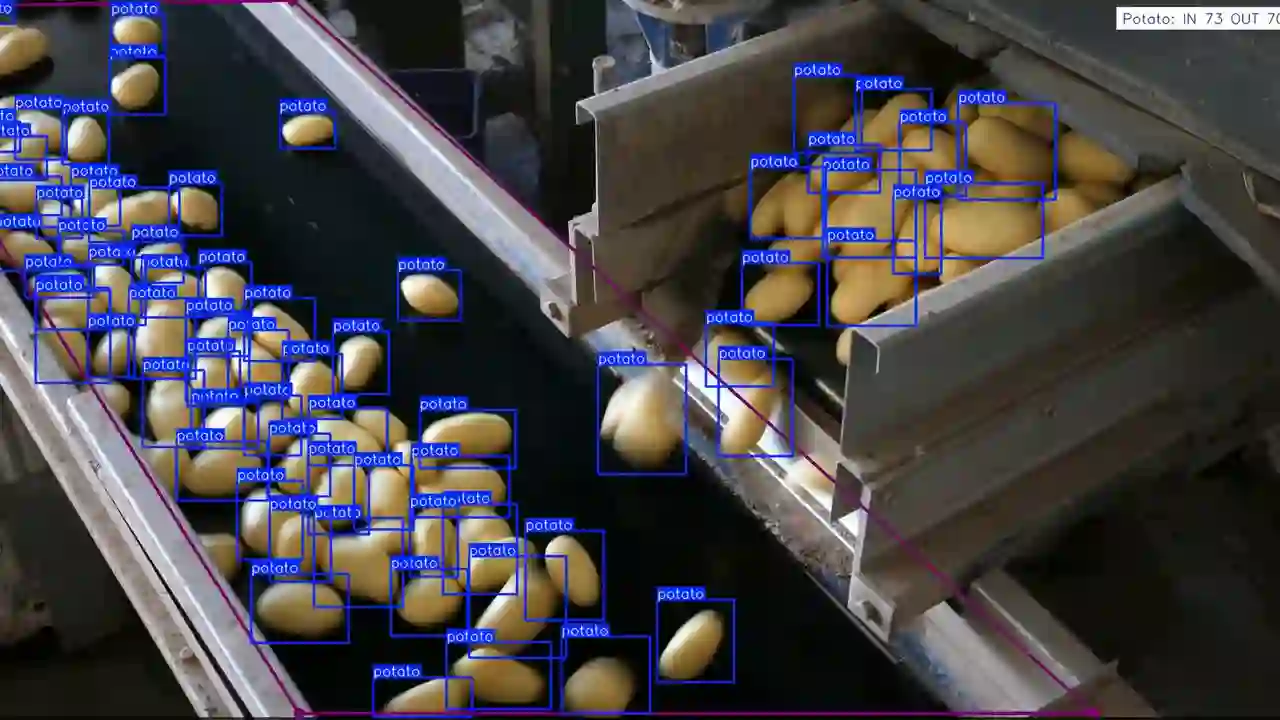
Here, YOLO11 nano detects potatoes, and Ultralytics' ObjectCounterfeature withpolygon-zone tracking counts how many pass through the zone.
The Processing Flow
| Step | What happens |
|---|---|
| 1. Extract frame | Pull one frame from the conveyor video |
| 2. Generate labels with SAM 2 | Auto-extract potato shapes and turn them into annotation data |
| 3. Train YOLO11 nano | Training finishes in tens of minutes (50 epochs, image size 1280px) |
| 4. Set polygon zone | Draw the counting region as a polygon (easy with Roboflow PolygonZone) |
| 5. Count in real time | Automatically count potatoes as they pass through the zone |
Inside the GitHub Code
This project is published on GitHub.
- Developer: Viet Nguyen (senior AI engineer in Berlin, working at Sporttotal)
- Developer profile: github.com/vietnh1009
- Counting system repo: github.com/NguyenHoangMinh1312/potato_counting
The repo structure is simple — just three files.
dataset.py: Dataset Merging
It reads multiple public datasets (hosted on Google Drive), removes labels that aren't potatoes, and formats everything into YOLO training data. It contains logic to extract only potatoes and unify their class ID to 0.
train.py: Training Script
Trains YOLO11 nano (yolo11n.pt). The settings are:
| Parameter | Value |
|---|---|
| Model | YOLO11 nano (yolo11n.pt) |
| Epochs | 50 |
| Batch size | 4 |
| Image size | 1280px |
| Learning rate | 1e-3 (cosine decay) |
main.py: The Counting App
It reads a video, detects and tracks potatoes with ObjectCounter, and counts how many pass through the polygon region you define. You can choose between the "botsort.yaml" or "bytetrack.yaml" trackers, and the output is saved to object_counting_output.avi.
On screen, each potato gets a blue bounding box with a "potato" label, and the top-right corner shows real-time counts like "Potato: IN 73 OUT 70".
Setup Steps (Simple 4-Step Guide)
What You Need
| Item | Details |
|---|---|
| PC | Linux (Ubuntu 22.04+) with Python 3.10+ |
| Libraries | PyTorch 2.6, TensorFlow 2.19, OpenCV 4.11, Ultralytics 8.3.111 |
| Camera | Fixed camera (a webcam works too) |
| Video | One video of the conveyor |
Steps
- Clone the repo:
git clone https://github.com/NguyenHoangMinh1312/potato_counting - Prepare the dataset: download the dataset from Google Drive and run
python dataset.py - Train: run
python train.pyto train YOLO11 nano - Count: adjust the polygon coordinates and model path in
main.pyfor your environment, then runpython main.py
For the polygon region (where items should be counted as passing), upload a frame to Roboflow PolygonZone, draw the region, and you'll get the coordinate list.
Ideas for Farms & Food Processing
This system's value isn't limited to counting potatoes. The same approach can auto-count and sort many kinds of produce.
Practical Use Cases
| Use case | Details |
|---|---|
| Count harvested produce | Auto-count potatoes, onions, carrots, etc. on the conveyor |
| Accurate shipping counts | Eliminate manual counting mistakes; cross-check against box counts |
| Size sorting support | Rough size classification using the detection box dimensions |
| Quality control | With more training data, can also detect bruises and discoloration |
Why It Fits Farms
- Low cost: runs on edge devices (Raspberry Pi / Jetson class) — no dedicated million-yen machine required
- Start with little data: one frame + SAM 2 auto-labeling creates training data
- Retrofit existing equipment: just mount one camera above the conveyor
- Fully customizable: swap potatoes for other produce (just rebuild the training data)
Caveats & Challenges
Honestly, there are things you should know before adopting it.
- Fixed camera only: if the camera angle or position changes, you must reconfigure the polygon and retrain or re-tune the model
- Lighting and speed matter: detection accuracy can drop when conveyor lighting or belt speed changes
- Not truly zero-data: the "one-frame annotation" is impressive, but you still need to generate training data from the whole video
- Overlapping potatoes: when potatoes overlap on the belt, they may be counted as one
- Personal project: for production use, you'll need to adjust and test for your own environment
Summary
The potato-counting system is a great example of how small, fast, and cheap is the key to real-world adoption.
- SAM 2 automates annotation and slashes training costs
- YOLO11 nano enables real-time counting even on edge devices
- The code is open on GitHub, so even farmers can try it
- It can be applied to produce beyond potatoes
If you think "AI requires massive data and giant models," this article is for you — I hope it shows the potential of local AI that starts from a single image.
One camera above your farm's conveyor. That alone could change your workflow dramatically.
Share this article
Related articles
Sep 7, 2026
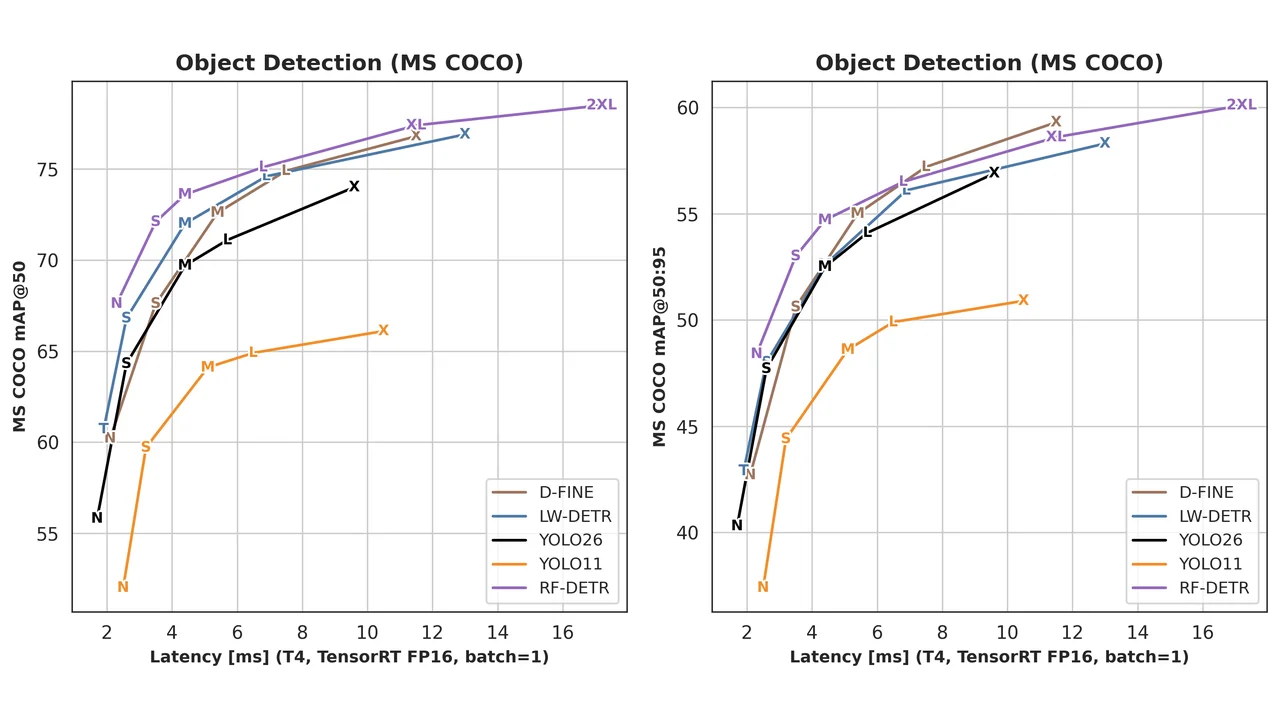
RF-DETR: The New Real-Time Object Detection King That Beats YOLO (2026 Guide)
Sep 13, 2026
Turn Your PC Into a Local AI Server With One Command — What ODS (Osmantic Deployment System) Actually Installs (2026 Guide)
Aug 22, 2026
MSI PRO B850-P WIFI Motherboard + MAG A850GL 850W PSU: The Best Foundation for a Local-AI PC Build (2026)
Aug 12, 2026
Wan2GP Complete Guide 2026: The Ultimate AI Video Generator for the GPU Poor, Explained for Beginners

Aug 11, 2026
Unsloth Desktop Complete Guide 2026: The First Desktop App to Run and Train Models Locally
Aug 20, 2026
Qwen3.8-27B GGUF Complete Guide 2026: How to Run Unsloth's Version on Your Home PC (File List, How to Choose, Setup Steps)