
Summary
That's exactly what the Hermes Quota plugin solves.
Hermes Quota Plugin: See Your AI Provider Quota at a Glance (2026 Guide)
"How much AI usage do I have left? Opening the API dashboard every time is a pain…"
"I juggle several AI providers and can't keep track of my remaining quota." "I want to know my limits before the next request fails."
That's exactly what the Hermes Quota plugin solves.
The verdict: Hermes Quota is a plugin that shows your remaining quota (usage limits) for each AI provider in real time, right inside Hermes Desktop. A status-bar chip and a dedicated sidebar pane let you see at a glance which provider has how much left.
This article explains installation, usage, CLI commands, and troubleshooting, with a diagram.
What you'll learn
- What Hermes Quota is
- How it works (data flow, with a diagram)
- Installation (3 steps)
- Reading the UI (status bar, pane, settings)
- CLI / chat commands
- Supported providers and Grok opt-in
- Troubleshooting
- FAQ
What is Hermes Quota?
Hermes Quota is a standalone Hermes Agent plugin published at rarf/hermes-quota-plugin.
Its job is simple: let you see your remaining AI provider quota before the next request fails.
Key features
- Status bar (bottom-right): a compact chip always shows your lowest remaining quota. Hover it for a full breakdown of every provider and window (Session, Spark 5h, Spark Weekly…) with % left and time-to-reset
- Quota pane (sidebar): one card per provider with the official brand icon, a tonal progress bar, plan badge, and detail lines (credits, banked resets)
- CLI / chat commands:
hermes quotaor/quotato check from terminal or chat
Supported providers
anthropic, openai-codex, nous, openrouter, gemini, kimi, plus grok (opt-in).
How it works (data flow, with a diagram)
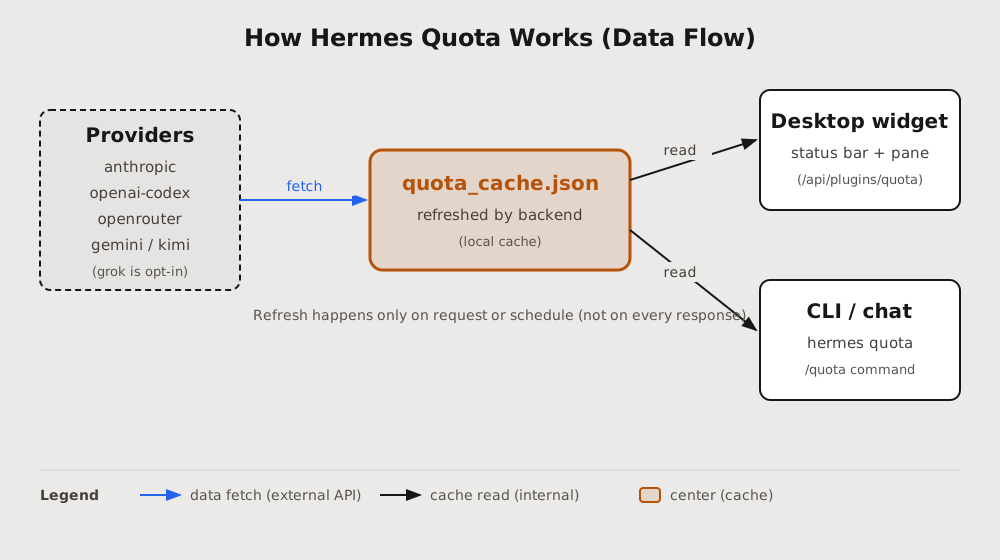
The design philosophy is "the UI never does network I/O of its own." The backend refreshes a local cache, and the UI simply reads it. This means checking quota adds no extra network call to a normal agent response.
Key points
- The backend fetches quota from each provider (anthropic, openai-codex, openrouter, gemini, kimi)
- The data is aggregated into quota_cache.json (a local cache)
- Both the Desktop widget and CLI/chat just read this cache
Important: refreshes happen only on request or on schedule — not on every model response. You get up-to-date quota without extra communication cost.
Installation (3 steps)
git clone https://github.com/rarf/hermes-quota-plugin.git
cd hermes-quota-plugin
./install.sh
Notes
- Windows: run from Git Bash
- macOS / Linux: run from a normal shell
- The installer copies the backend and Desktop widget and enables the plugin
- Re-run anytime to update;
./uninstall.shremoves it symmetrically
Multi-profile note
Hermes resolves plugins per profile. In named profiles (like affiliate), a plugin installed only at the global root (~/.hermes/) may show "backend unavailable." ./install.sh handles this for you.
Reading the UI
1. Status bar (bottom-right)
A compact chip always shows your lowest remaining quota.
- The chip displays the worst remaining quota
- Hover to expand a tooltip with a full breakdown (every provider, every window, % left, time-to-reset)
- Toggle between "worst only" and "all providers" in Settings
2. Quota pane (sidebar)
One card per provider, showing:
- Official brand icon
- Tonal progress bar
- Plan badge
- Detail lines (credits, banked resets)
Providers without data collapse into a quiet "No data" section; the default view shows only providers with live numbers.
3. Quota Settings
Toggle any provider on or off individually. Your choice is local and persists.
CLI / chat commands
Terminal (CLI)
hermes quota              # show all providers
hermes quota refresh      # fetch fresh data
hermes quota status       # show status (--json for JSON)
hermes quota provider     # per-provider view
In chat (slash commands)
/quota            # show quota
/quota refresh    # force a re-fetch
/quota grok       # show Grok quota
Example output
📊 quota (fetched 1m ago)
• openai-codex · Session 45% (reset tomorrow 06:43)
• grok · Weekly 72% (reset tomorrow 18:00)
• gemini: unavailable (consumer-tier-deprecated)

_Run `/quota refresh` to force a re-fetch._
"unavailable" is the honest state for a provider with no credentials or no supported quota endpoint.
Grok is opt-in
Grok is the only provider read from your browser (Firefox grok.com cookies), so it's disabled by default.
To enable
hermes config set plugins.entries.quota.settings.grokEnabled true
hermes quota refresh
- When off, Grok just reports "opt-in-disabled" — no cookies are read
- Close Firefox before refreshing
- Failures report
auth-failedorcloudflare-blocked, never a fake "0%"
Troubleshooting
Desktop says "Quota backend unavailable"
The backend is mounted when Desktop starts; reloading JavaScript alone isn't enough.
- Close every Hermes Desktop window
- Reopen Desktop
- Run:
hermes plugins doctor quota
hermes quota refresh
Grok says "no-session-cookies"
The plugin searches the standard Firefox profile automatically. Make sure you're signed in.
Grok says "auth-failed" or "cloudflare-blocked"
Your session expired or Grok rejected the request. Sign in again and refresh. Never paste cookies into an issue or chat.
Privacy and safety
- No telemetry or analytics
- Cookies and tokens are never printed
- Grok cookies are used only for the Grok billing request
- Missing credentials produce an explicit "unavailable" state
- Does not override built-in Hermes tools
Questions Readers Ask
Q. Is Hermes Quota free? Yes. MIT license, free to use.
Q. Does it work with any Hermes? It's a Hermes Desktop plugin. It's standalone, so it survives updates.
Q. Does it add network calls? No extra calls during normal model responses. It reads a cache, so quota checks never slow down a response.
Q. Can I add providers?
Yes. Register a fetcher in quota_providers/ that returns a QuotaResult; the cache and widget need no provider-specific changes.
Q. Does it work with multiple Hermes profiles?
Yes, ./install.sh handles named profiles.
Q. Why does quota show "unavailable"? No credentials, or the provider has no supported quota endpoint. That's normal behavior.
Summary: free yourself from quota anxiety
Hermes Quota shows your remaining AI provider quota right inside Hermes Desktop.
- Status bar always shows the lowest remaining quota
- Sidebar pane shows every provider in detail
/quotafrom CLI or chat for instant checks- Cache-based, so no extra communication cost
If you want to know your remaining quota before the next request fails, this plugin is worth installing. It takes 3 steps.
Reference
Information as of August 2026. Plugin specs and supported providers may change with updates — check the GitHub repo for the latest.
Share this article
Related articles

Aug 9, 2026
Hermes HUD Mode Complete Guide 2026: The Overlay AI Agent That Sees, Understands, and Controls Your Screen

Jun 22, 2026
Hermes Agent Complete Guide 2026: The Most Powerful Open-Source AI Agent by Nous Research
Aug 1, 2026
BREAKING (July 31, 2026): DeepSeek V4 Flash Official API Goes Public Beta! Agent Performance Surpasses V4 Pro Preview — Native Support for 6 Tools

Jun 22, 2026
Hermes Agent vs Cursor — Full Comparison 2026: Which Should You Choose? Complete Guide to Using Both
Jul 30, 2026
Perplexity Numbat Complete Guide 2026: The Open-Source Security Layer That Visualizes & Blocks AI Agent Actions
Aug 25, 2026
AgentSky Guide 2026: Run Claude Code, Codex & Hermes in the Cloud with One API (The OpenRouter for Agents)